Taking the first price from a product page gave a wrong price for 21 of 33 stores
AI agents and data pipelines read prices, names and article text from web pages. When an extractor returns a wrong value, the pipeline usually shows no error. The wrong value goes into the database or the agent’s answer, and it looks like any other value.
I tested this on 33 real product pages and 11 block and error pages. The simplest rule returned a wrong price for 21 of the 33 stores. Most of those wrong prices came from free-shipping and minimum-spend banners. A local LLM returned no wrong prices, but it returned no price for 3 pages.
This post shows the test, what each method got wrong, and how production teams handle these errors.
The test
I ran everything from Mumbai on October 16, 2026, on home broadband with no proxy. I fetched each page once with httpx and a Chrome user agent, then ran every extractor on the saved HTML.
- Product pages. I collected one product page from each of 34 stores. Most are direct-to-consumer brands. Many large retailers I tried didn’t return a usable product page to a plain HTTP client. I kept a page only if its JSON-LD price also appeared in the visible page text. That price is the ground truth.
- Pages without structured data. Reading JSON-LD is the easy case, but some product pages don’t include it. The Walmart product page I fetched had no product data in JSON-LD. To test the harder case, I removed the JSON-LD, the microdata attributes and the product meta tags from each page. The rest of the HTML stayed the same.
- Block and error pages. I saved 11 pages that a plain HTTP client got instead of real content. They include block, challenge and login pages from sites protected by DataDome, PerimeterX, Akamai and Cloudflare, a 404 page, and a JavaScript page with an empty body.
- Tools. Two rule-based methods, Trafilatura 2.3.1, Resiliparse 1.0.9 and Qwen 3.5 9B running locally in Ollama at temperature 0, in one run.
Five stores showed prices in Indian rupees, probably because the test ran from India. One store, AG1, shows a $89 monthly subscription next to a $119 one-time price. Both are reasonable answers, so I left this store out. The results cover the other 33 stores.
The first price on the page
The simplest rule takes the first price in the visible text. It’s a baseline that shows what happens when code takes the first number that looks like a price. The second rule takes the first price after the product title, the page’s h1. Both rules read the visible text with a regular expression for currency amounts. Zyte’s open-source price-parser (opens in a new tab) library turns the match, like “Rs. 1,000.00”, into a number.
| Method | Right | Wrong | Empty |
|---|---|---|---|
| First price on the page | 12 | 21 | 0 |
| First price after the title | 23 | 5 | 5 |
| Qwen 3.5 9B, page text only | 30 | 0 | 3 |
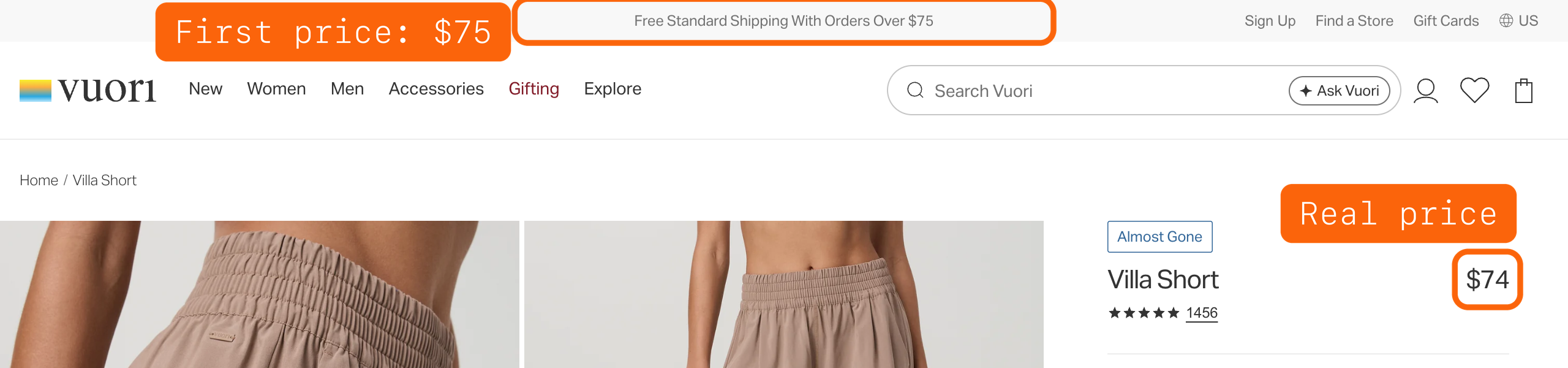
I checked all 21 wrong prices from the first rule by hand. 15 came from a free-shipping or minimum-spend line near the top of the page, like “Free shipping on orders over $75”. On one page, the banner said $75 and the product cost $74, so a range check can’t catch the error. The other 6 were a menu item (“Gifts Under $50”), the prices of 2 other products and a promotion for a different item. The last 2 were a “was” price shown before the sale price, and a per-pair price on a 2-pack.
Starting after the title removed most of the banner prices. But it found no title or no price on 5 pages, and it picked 5 wrong prices. One page’s first h1 was a “Free Shipping & Returns” pop-up, so the rule picked the $50 shipping threshold. On another page, the title text first appeared in the name of a related product, so the rule took that product’s price. The others were a “was” price, the per-pair price and a “$32.00 value” line on a gift set.
The LLM read the visible page text and returned JSON with a name, a price and a currency. It returned no wrong prices. On 3 pages it returned nothing, including a “Sold out” bag where the $15 price was still on the page.
Wrong and empty are different failures
An empty price is easy to catch. A required-field check fails, the record is rejected, and someone checks the page. A wrong price passes every type check. It’s a number, it has a currency, and it’s in a realistic range. A free-shipping threshold of $75 looks exactly like a price.
So one accuracy score doesn’t show the most important difference. The first rule scored 12 of 33, and every miss was a wrong value. The LLM scored 30 of 33, and every miss was an empty value. When you test an extractor, count 3 outcomes for each field. A value is right, wrong or empty.
A check for words like “shipping”, “orders”, “over”, “spend” and “free” next to the price would have flagged 15 of the 21 wrong prices. I didn’t test how many correct prices the same check would also flag, so test it on your own pages before you use it.
Extractors also receive block pages
Extraction tests usually use clean pages. In production, the extractor also receives whatever the fetch returned. I gave the 11 block and error pages to Trafilatura, a widely used open-source text extractor.
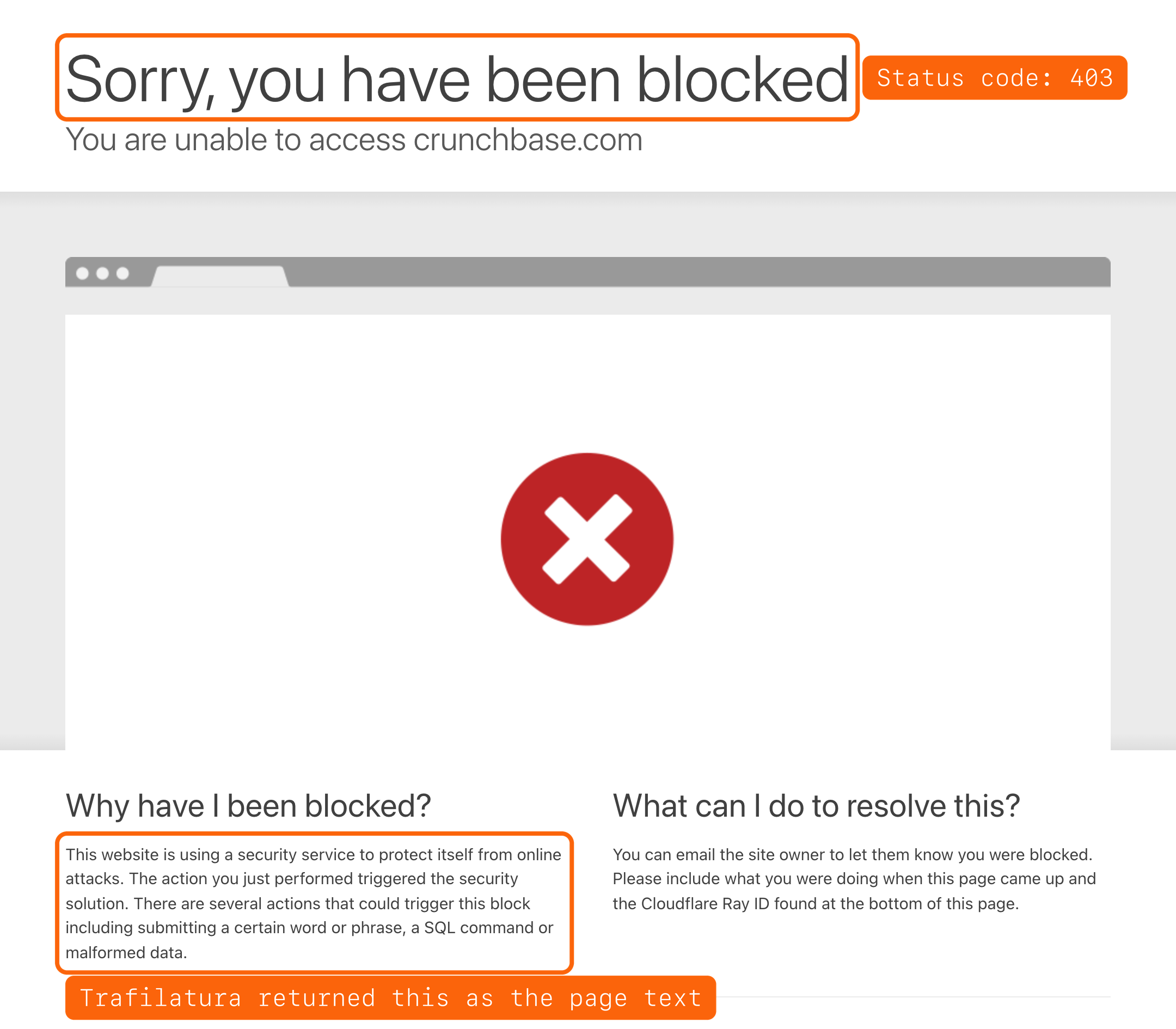
Trafilatura returned text for 9 of the 11 pages. The text was the block page itself, such as “Please enable JS and disable any ad blocker” and “This website is using a security service to protect itself from online attacks”. It returned nothing only for the PerimeterX page and the JavaScript page with an empty body. A text extractor’s job is to return the main text of whatever it receives, so this is expected behavior. So the block check has to happen before extraction.
I also asked the LLM to extract a product from the same 11 pages. It returned empty fields for all 11 and didn’t invent a product.
All 11 pages returned a 4xx status code, except the JavaScript page, which returned 200. So a pipeline that keeps the status code and checks it before extraction would catch 10 of the 11. At Prague Crawl 2026, Logan Harless (opens in a new tab) said that “vendors with serious mindshare are returning 200 when really what they’re serving you is a CAPTCHA”. His team’s classifier also checks the headers and the ratio of script to text, not only the status code. I covered this in more detail in how production teams classify failed scrapes.
Extractors do well on articles and worse on other page types
Open-source extractors work well on articles. On Zyte’s article extraction benchmark (opens in a new tab), 181 news and blog pages, Trafilatura 2.3.1 scored an F1 of 0.960 in my run. Its output had about 98% fewer tokens than the raw HTML. The median page went from 32,987 tokens of HTML to 723 tokens of text, counted with OpenAI’s o200k_base tokenizer. The benchmark’s reference text is also about 98% smaller than the HTML, so any extractor that finds the main content saves about this many tokens.
Other page types are harder. WCXB (opens in a new tab), a benchmark published in May 2026, has 511 held-out test pages across 7 page types. These are Trafilatura’s scores in my run, by page type.
| Page type | Pages | F1 |
|---|---|---|
| Article | 257 | 0.937 |
| Documentation | 42 | 0.933 |
| Service | 59 | 0.817 |
| Forum | 51 | 0.791 |
| Listing | 40 | 0.748 |
| Product | 28 | 0.721 |
| Collection | 34 | 0.633 |
Collection pages, like category grids, scored lowest. The benchmark’s README explains that these pages mix filter and navigation panels with the product cards, and extractors often include those panels in the output. If your agent reads product pages or category pages, test it on those page types, not on articles.
Speed is a trade-off too. Resiliparse took a median of 0.6 ms per page on the article benchmark, and Trafilatura took 8.6 ms, on one core of an Apple M3. On the same benchmark, Trafilatura scored higher, 0.960 against 0.881. Hugging Face used Trafilatura for FineWeb (opens in a new tab). The DataComp-LM (opens in a new tab) team chose Resiliparse, because it was about 8 times faster with similar results for model training. I compared the two on Common Crawl pages in an earlier test.
What production teams do
Production teams handle these failures in layers. Several talks at 2026 conferences describe them.
- Check the fetch first. Classify each response as content, block, error or empty before extraction, as described above.
- Read structured data when it exists. JSON-LD or the page’s own JSON data gives the price in a named field, so the code doesn’t have to guess which number is the price.
- Make required fields required. At Extract Summit 2026, Konstantin Lopukhin (opens in a new tab) of Zyte said, “There should not be really a product without a price”. In his spider framework, the code raises an error when a required field is missing, instead of returning empty records. For optional fields, he described tracking how often each field is present compared with the last crawl.
- Compare two methods on a sample. Zyte’s CEO, Shane Evans (opens in a new tab), said that AI writes the extraction code, and an LLM also extracts a sample of pages directly. Zyte compares the two results, which he called “a very good way in production to spot things that are wrong”. His example was a store that changes how it shows discounts. The crawl still returns the same fields, so the problem doesn’t show.
The free-shipping prices in this test are that kind of error. A field-presence check would pass them. A comparison with a second method, or a check against the page’s JSON-LD, would flag them.
How to test an extractor before you rely on it
- Use pages of the type your agent or pipeline will read, from many different sites.
- Build the ground truth from something independent of the extractor, like JSON-LD that matches the visible page, and check disputed cases by hand.
- Count right, wrong and empty separately for each field.
- Add the block, error and empty pages that your fetcher really receives.
If you want the URLs, the ground-truth prices or the scripts behind these results, email me and I’ll share them.