Rusteerio matched Cheerio's output on 353 real homepages and was 3.4 times faster
Cheerio is the standard library for parsing HTML in Node.js. It got 111.8 million npm downloads in the 30 days to October 17, 2026, in my stars and downloads test.
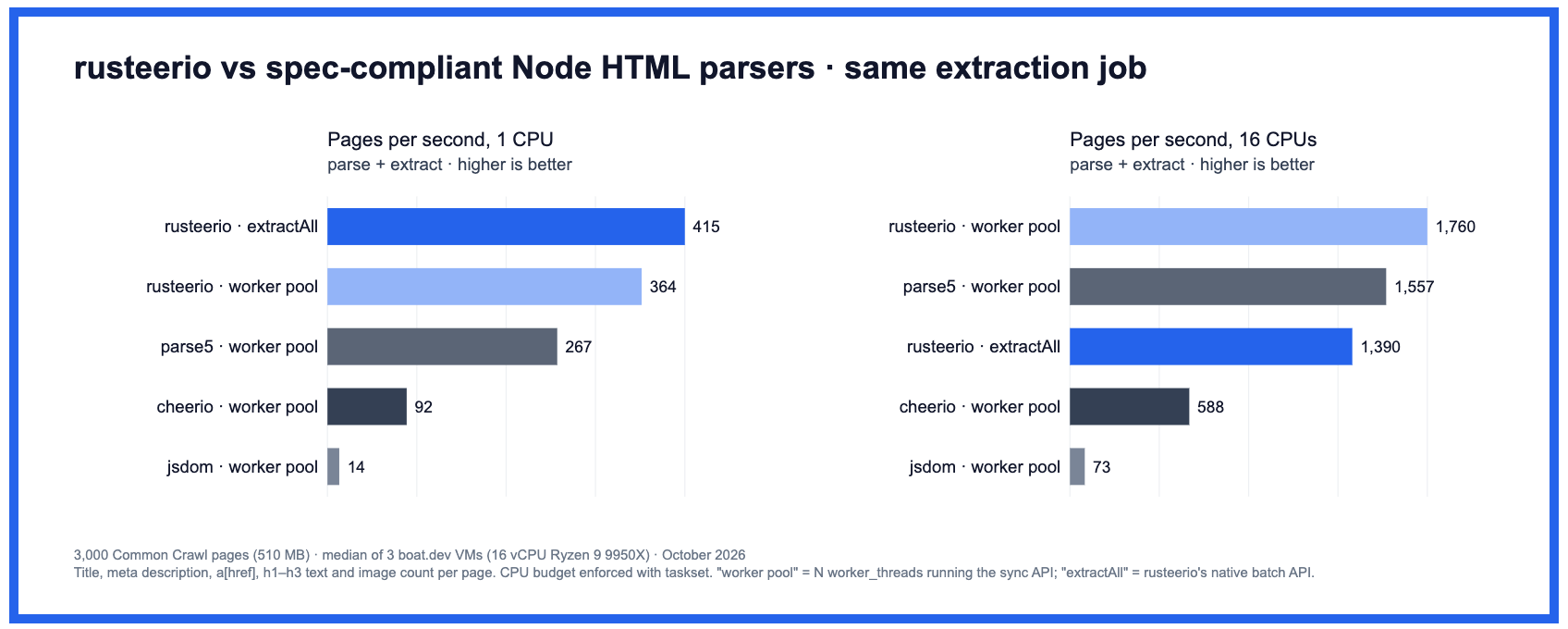
Rusteerio is a Rust port of Cheerio from Context.dev, released in October 2026. Its README says it gives the same output as Cheerio, and that it ran a page extraction job about 4 to 4.5 times faster on one CPU.
I tested both claims on different pages and a different machine. On 353 homepages of top websites, Rusteerio gave the same output as Cheerio on every page. It was faster on every page, 3.4 times faster in total, and the gain grew with the size of the page.
The test
I ran everything on October 20, 2026, on an Apple M3 Mac with Node.js 25.9.0.
- Pages. I fetched the homepage of each site from my robots.txt study once, with a plain HTTP client. I kept the 353 pages that returned HTML of more than 5 KB. The median page was 286 KB, and the largest was 6.1 MB. Rusteerio’s own benchmark used 3,000 Common Crawl pages, so these are different pages.
- Libraries. Cheerio 1.2.0 and Rusteerio 2.0.0, through the same synchronous
load()call most Cheerio code uses. I didn’t test Rusteerio’s worker pools or its batch API. - Output check. For each page, both libraries ran the same extraction. I compared 9 results: the title, the meta description, every link, the text of every h1 to h3 heading, the number of images, every JSON-LD block, the number of elements, the full body text, and the full HTML that
$.html()returns. - Speed. I timed loading the page and running the extraction, without
$.html(). Each page ran 5 times with each library, in alternating order, and I used the median.
This is the extraction function. I ran the same function with both libraries, and only the require line changed.
const $ = require('rusteerio').load(html); // or require('cheerio')
const result = {  title: $('title').first().text(),  description: $('meta[name="description"]').attr('content') ?? null,  links: $('a[href]').map((i, e) => $(e).attr('href')).get(),  headings: $('h1, h2, h3').map((i, e) => $(e).text().trim()).get(),  images: $('img').length,  jsonld: $('script[type="application/ld+json"]').map((i, e) => $(e).text()).get(),  elements: $('*').length,  bodyText: $('body').text(),};
Results
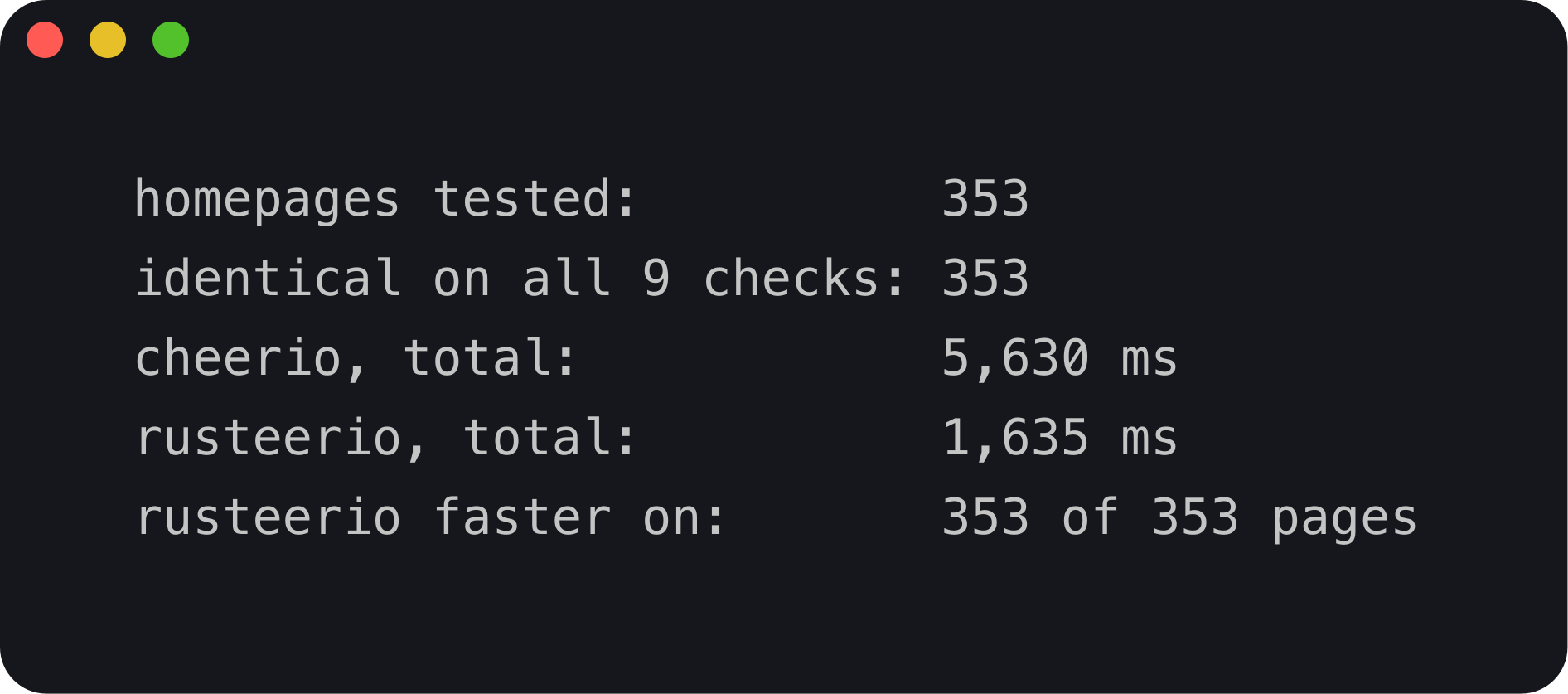
All 9 results were identical on all 353 pages, including the full HTML output. In total, Cheerio took 5,630 ms and Rusteerio took 1,635 ms. The median page took 8.7 ms with Cheerio and 3.4 ms with Rusteerio.
I also tested a common cleaning step. Both libraries removed every script, style and noscript element and then read the body text. The text was identical on all 353 pages, and Rusteerio was 3.8 times faster in total.
With 3 runs per page, 4 small pages looked slower or no faster with Rusteerio. With 15 runs, Rusteerio was faster on all 4, by 1.4 to 2.3 times. The difference was timing noise, so short benchmarks on small pages need more runs.
The gain grows with page size
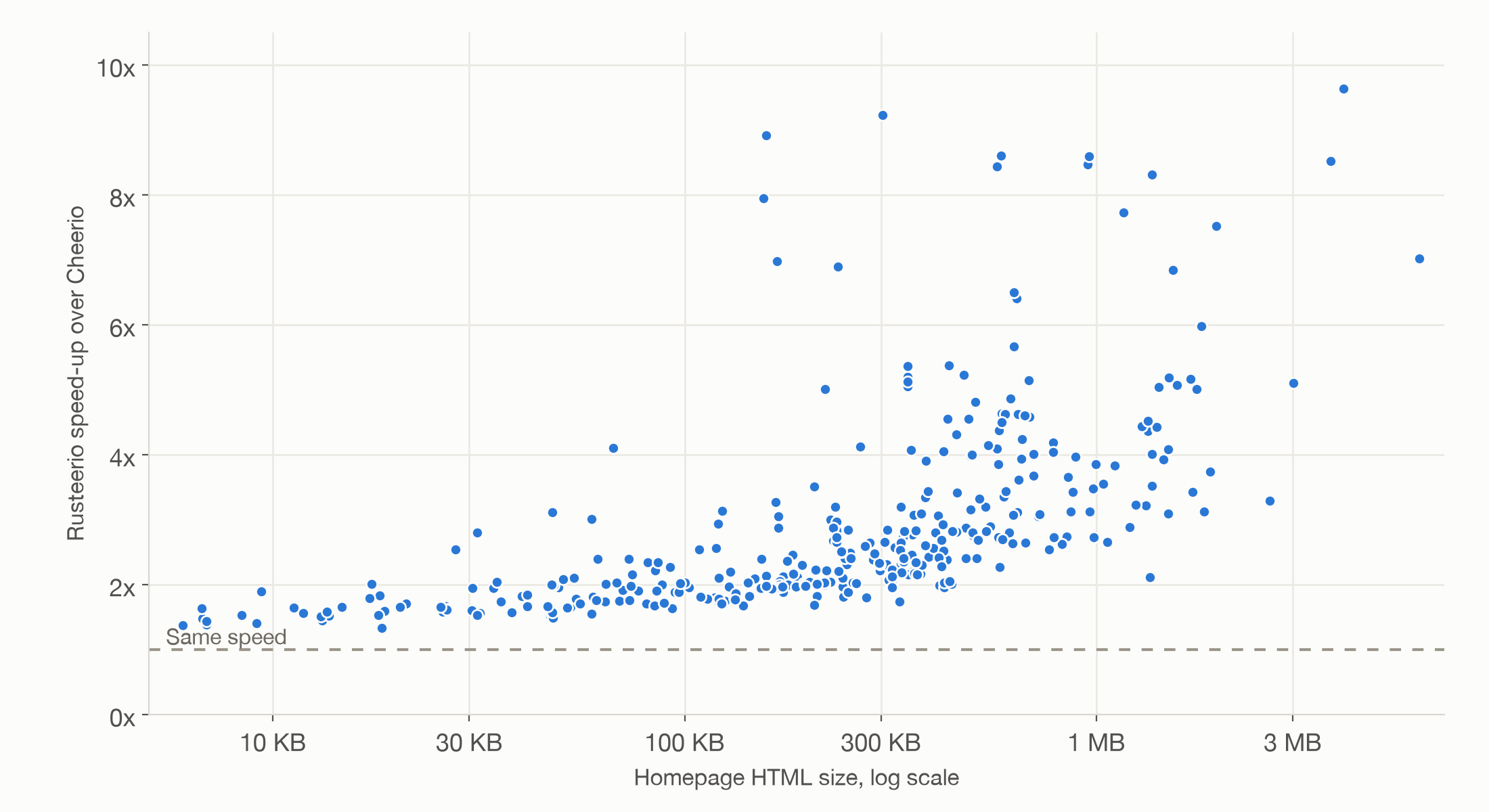
| Page size | Median speed-up | Median time, Cheerio | Median time, Rusteerio |
|---|---|---|---|
| 6 to 108 KB | 1.7 times | 1.7 ms | 0.9 ms |
| 109 to 281 KB | 2.1 times | 5.6 ms | 2.7 ms |
| 286 to 540 KB | 2.6 times | 11.4 ms | 4.5 ms |
| 541 KB to 6.1 MB | 3.9 times | 34.9 ms | 9.1 ms |
Each row is a quarter of the pages. On small pages, Rusteerio saved less than a millisecond per page. On the largest quarter, it saved about 25 ms per page.
When the speed-up matters
Parsing is a small part of most scrapes. In my Browser Use test, fetching a product page took a median of 1.0 second. Next to that, saving 5 ms on parsing doesn’t change much.
It matters when parsing is the slow part. Examples are re-processing stored HTML, like Common Crawl data or your own archive, running extraction over millions of saved pages, or paying for CPU time per request. In those cases, a 3 to 4 times faster parser can mean fewer machines.
Before you switch
- It’s new. The package first appeared on npm on October 13, 2026, and version 2.0.0 was published on October 16. It runs as a native addon, with prebuilt binaries for macOS, Linux and Windows.
- Test it on your own pages. My test covered common read operations and one removal step. If your code changes the document a lot, or uses less common selectors, run your own pages through both libraries and compare the output, as I did here.
- Measure your own bottleneck first. If your pipeline waits on the network, a faster parser won’t make it much faster.
If you want the page list, the results or the scripts, email me and I’ll share them.