How 16 scraping tools and headless browsers identify themselves, and which check robots.txt by default
Site owners rely on 2 things to control scraper access. The user agent tells them who is visiting, and robots.txt tells crawlers which pages they may crawl. The user agent helps only if the tool sends an identifiable one, and robots.txt helps only if the tool reads it.
I tested 16 popular scraping tools and headless browsers, including browser tools built for AI agents, with their default settings. 14 of them fetched a page from a local test site whose robots.txt disallowed that page. 6 named themselves in the user agent. 5 identified as HeadlessChrome, so a site could see they were automated but not which tool. 5 sent a regular browser user agent, or no user agent at all.
Of the 14 tools I could test against a local test site, only Scrapy in a Scrapy project checked robots.txt with default settings, because the project template enables the check. Lightpanda, Obscura and Crawl4AI each have a robots.txt option, but it’s off by default.
Why this matters now
Site owners report these problems in GitHub issues on the tools’ own repositories. In August 2026, the Haskell infrastructure team asked Lightpanda (opens in a new tab) why Lightpanda users kept crawling their GitLab server, which disallows them in robots.txt. They also asked why the robots.txt check is off by default. A similar issue on Firecrawl (opens in a new tab) asks for an identifiable user agent, and one on Scrapy (opens in a new tab), from a site that got 38,000 requests in 17 minutes, asks for defaults that respect rate limits. Many browser tools for AI agents are built on Playwright or Puppeteer, and unless configured, they inherit those libraries’ defaults.
What each tool sent
Each of the 14 tools fetched the same page from a local test site. Its server logged every request with all its headers. The site’s robots.txt disallowed the page for all user agents (User-agent: *).
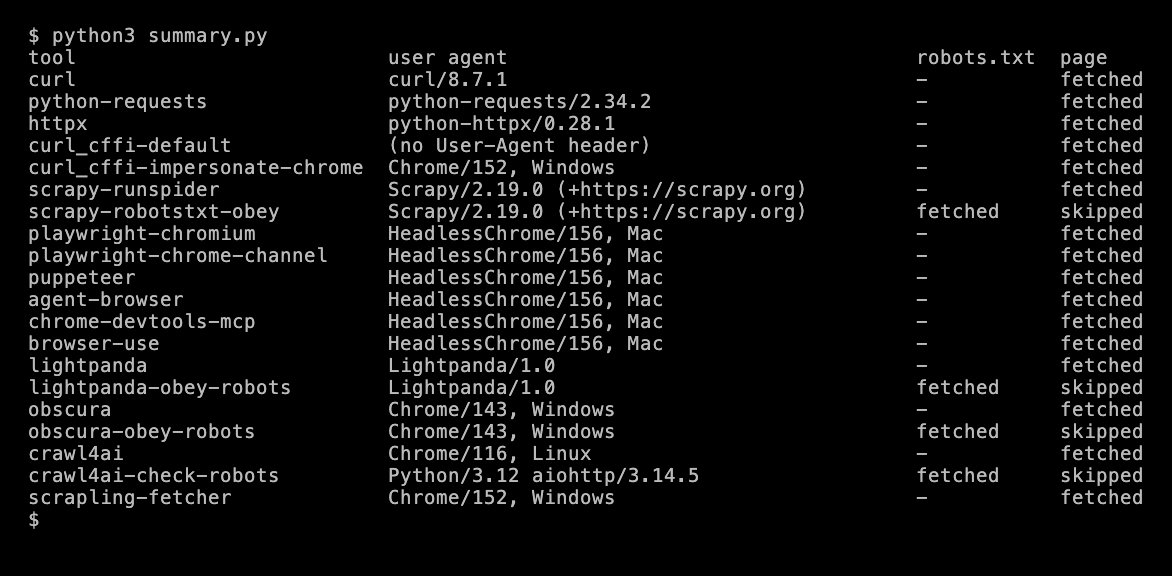
The other 2 tools couldn’t be tested against the local test site. Trafilatura 2.3.1 sends trafilatura/2.3.1 (+https://github.com/adbar/trafilatura), and the hosted Jina Reader sends a regular Chrome 156 user agent for Linux. I checked both with a public HTTP echo service, which returns the headers it receives, so I couldn’t test whether they read robots.txt.
3 groups of tools
They name themselves. curl, python-requests, httpx, Scrapy, trafilatura and Lightpanda send their own name, and Scrapy and trafilatura add a URL. A site can block each one with a single rule. It still can’t see who runs the scraper, unless the user adds their own name and contact details. Lightpanda is the strictest about this. Its --help output says its --user-agent option rejects any value containing “Mozilla”, so users can’t set a browser user agent. It offers --user-agent-suffix so users can add their own details instead.
They send HeadlessChrome. Playwright, Puppeteer, agent-browser, Chrome DevTools MCP and browser-use all run Chrome or Chromium, and in headless mode both put HeadlessChrome in the user agent. A site can see the request is automated, but not which tool sent it, or who runs it.
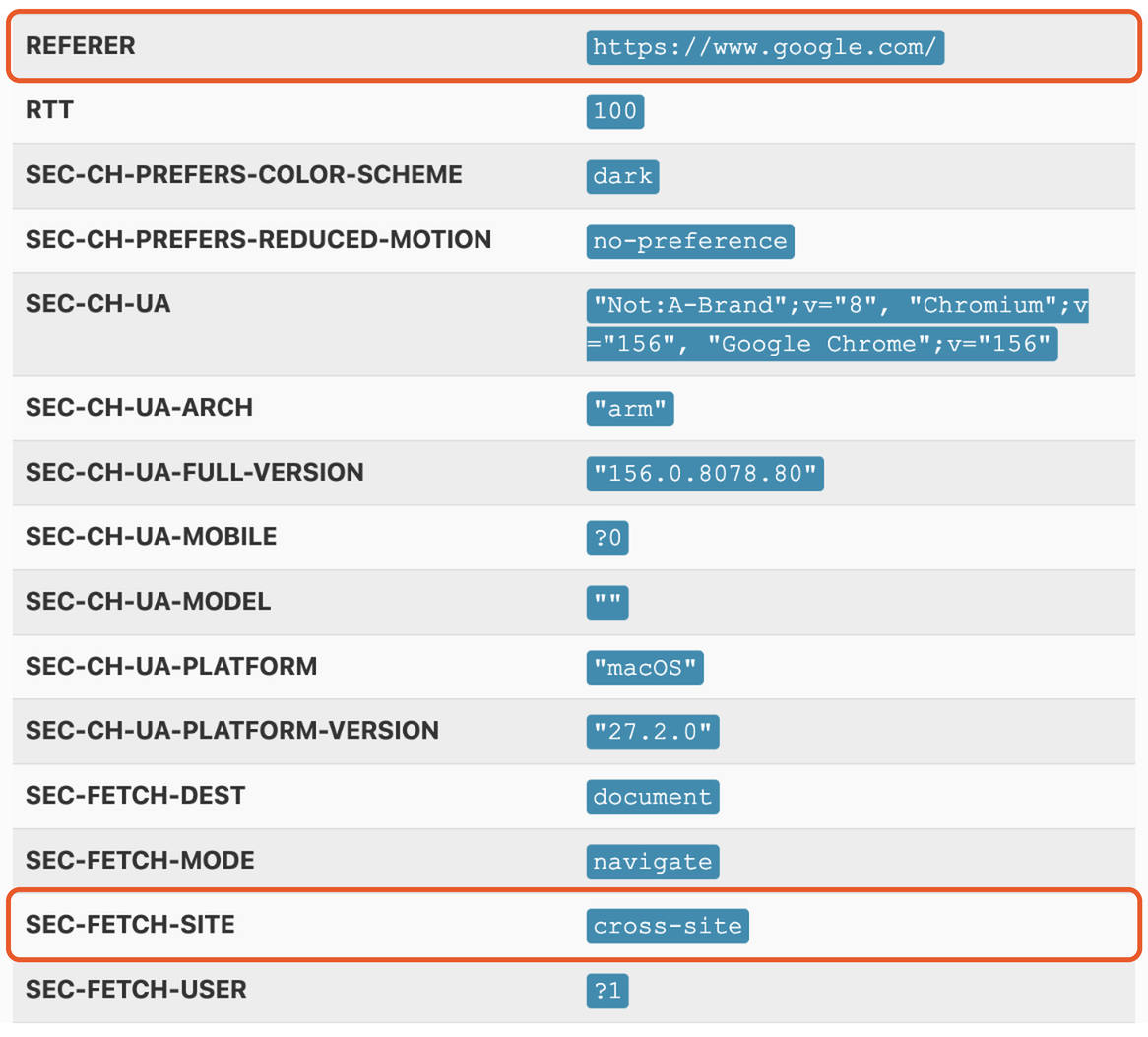
They send a regular browser user agent, or none. Obscura sends a Chrome 143 user agent for Windows, even on a Mac. Scrapling’s default Fetcher sends Chrome 152 for Windows with google.com as the Referer header, so the visit looks like it came from a Google search. Jina Reader sends Chrome 156 for Linux. Crawl4AI sends Chrome 116 for Linux, a version from 2023, while the browser it actually runs is Chromium 156. curl_cffi sends no user agent by default, and a Chrome user agent when configured to impersonate Chrome.
These tools are built for users who need pages to load the same way they load for a person, and many of those users have good reasons. But to a site owner checking the user agent, most of these visits look like visits from a person.
Scrapling’s headers also disagree with each other. Its request says it came from Google, but it also sends Sec-Fetch-Site: none, which Chrome uses when the user starts the visit, for example by typing the URL or opening a bookmark. When I clicked a Google search result in Chrome 156, it sent the same Referer with Sec-Fetch-Site: cross-site. A site that compares headers can detect the mismatch, even though the user agent looks like Chrome.

Checking robots.txt is opt-in
With default settings, only Scrapy in a Scrapy project fetched robots.txt and skipped the disallowed page. In Scrapy itself, ROBOTSTXT_OBEY defaults to False, but scrapy startproject creates a settings.py with ROBOTSTXT_OBEY = True. A standalone spider run with scrapy runspider doesn’t check robots.txt.
3 other tools have a robots.txt option.
- Lightpanda with
--obey-robotsfetchedrobots.txtand skipped the page. - Obscura with
--obey-robotsdid the same. - Crawl4AI with
check_robots_txt=Trueskipped the page too. But it fetchedrobots.txtasPython/3.12 aiohttp/3.14.5, a different user agent from the one it sends for pages, so a site owner sees 2 different visitors.

The plain HTTP clients (curl, python-requests, httpx and curl_cffi) don’t read robots.txt. They only send requests, so the scraper built on them has to check it.
What to do if you run scrapers or AI agents
- Send a user agent that names you. Put your product name, a URL to a page about your bot and a contact email in it. Most of these tools let you set a custom user agent, for example
user_agentin Playwright’snew_context(),USER_AGENTin Scrapy,--user-agentin agent-browser anduser_agentin Crawl4AI’sBrowserConfig. - Enable the robots.txt check your tool already has, or add one. For Scrapy, keep
ROBOTSTXT_OBEY = Trueinsettings.py. For Lightpanda and Obscura, add--obey-robots. For Crawl4AI, setcheck_robots_txt=True. - Read robots.txt with the same user agent you use for pages, so the site sees one consistent visitor.
This script does all 3 for a plain HTTP client. It reads robots.txt once per site, with the same user agent, and skips disallowed pages.
"""Fetch pages with a user agent that names you, and check robots.txt first.Run with: uv run --with httpx python polite_fetch.py https://example.com/page"""import sysfrom urllib.parse import urlsplitfrom urllib.robotparser import RobotFileParserimport httpx
UA = "ExampleBot/1.0 (+https://example.com/bot; bot@example.com)"  # who you are, and how to contact yourules = {}  # one robots.txt per site

def allowed(client, url):    site = "{0.scheme}://{0.netloc}".format(urlsplit(url))    if site not in rules:        rp = RobotFileParser()        r = client.get(f"{site}/robots.txt")        if r.status_code in (401, 403) or r.status_code >= 500:            rp.disallow_all = True  # the same rules as Python's urllib.robotparser        else:            rp.parse(r.text.splitlines() if r.status_code == 200 else [])        rules[site] = rp    return rules[site].can_fetch(UA, url)

with httpx.Client(headers={"User-Agent": UA}, follow_redirects=True, timeout=20) as client:    for url in sys.argv[1:]:        if not allowed(client, url):            print(f"skipped (robots.txt): {url}")            continue        print(f"{client.get(url).status_code} {url}")
Against the test site, it read robots.txt as ExampleBot/1.0, skipped the disallowed page and fetched an allowed one.
skipped (robots.txt): http://127.0.0.1:8777/private/page.html200 http://127.0.0.1:8777/public.htmlWhat it means for site owners
A robots.txt rule is followed only by tools that are set to read it. Of the 16 tools here, a rule that matches the User-Agent header, on the web server or in a WAF, can block the 6 that name themselves. It can also block the 5 that send HeadlessChrome, but that also blocks every other tool built on headless Chrome, including legitimate automation. By user agent alone, a site can’t see the difference between the tools that send a regular browser user agent and human visitors. The exception is curl_cffi’s default request, which has no user agent at all. That’s one reason sites rely on anti-bot systems that check much more than headers, like TLS and browser fingerprints, and why a scraper that names itself is easier to allowlist than one that doesn’t.
Test setup and limits
- When and where. October 30, 2026, on an Apple M3 Mac, against a local test site, one run per tool and setting.
- Versions. curl 8.7.1, python-requests 2.34.2, httpx 0.28.1, curl_cffi 0.17.0, Scrapy 2.19.0, Playwright 1.64.1 with its bundled Chromium and with Chrome 156, Puppeteer 25.16.0, agent-browser 0.39.3, Chrome DevTools MCP 1.12.0, browser-use 0.13.14, Lightpanda 1.0.2, Obscura 0.2.5 without its stealth mode, with private IP addresses allowed, Crawl4AI 0.9.5, Scrapling 0.5 with its default
Fetcher, trafilatura 2.3.1 and Jina Reader. - Defaults only. Each tool ran with its default settings, plus its
robots.txtoption where it has one. Many tools can send other user agents or headers when configured, so results in real use can differ. - The user agent is one signal. Sites also see TLS fingerprints, browser fingerprints and request patterns, which this test didn’t measure.
- Not tested locally. Jina Reader is hosted, and trafilatura blocks requests to private IP addresses like
127.0.0.1by default, as protection against server-side request forgery (SSRF). Obscura does the same, and I used its documented setting to allow private IP addresses for this test. - Not included. Firecrawl needs an account, so it isn’t one of the 16 tools.
- Noise. The test machine had a browser extension that sometimes sent requests to local ports. I removed those requests from the published logs.
Data and code
- Every request each tool sent, one log per tool in the same folder, with all headers, plus the HTTP echo responses for trafilatura and Jina Reader
- The test server, the runner script, the Scrapy spider and the summary script
- polite_fetch.py and the VHS tapes that made the terminal images, for the summary, the Scrapling headers and the Crawl4AI logs