Do you need a browser for web scraping? A 1,000-site test
Only 5% of the top websites I tested needed a browser to show their content. Blocking was a far bigger reason to use one. On 17% of sites, a plain HTTP request was blocked while a headless browser got through.
I ran the test because the question kept coming up in the scraping talks I covered in my last post. Scrape.do’s founder said “more than 99% of our requests work without a browser”. Browserbase said request-based clients have “no chance” against modern anti-bot systems. Neither side had shared independent data, so I collected some.
How the test worked
I took the top 1,000 domains from the Tranco list published on September 29, 2026. Tranco is a ranking of popular domains that researchers use because it’s hard to manipulate.
For each domain, I loaded the homepage twice.
- A plain HTTP request, with Python’s
httpxlibrary and a normal Chrome user agent. This is how many scrapers work. - A headless Chromium browser, through Playwright, with the same user agent. It waited for the page to finish loading.
Then I compared the text each one got. If most of the words a person sees in the browser were also in the plain HTML, the page didn’t need a browser.
Each site got 1 request to robots.txt, 1 plain request and 1 browser load. I skipped the 32 sites whose robots.txt asks all crawlers to stay out, including Facebook and Twitter. Nothing tried to get past a block. A block was recorded as a result.
About half of the top 1,000 domains aren’t websites people visit. Domains like gstatic.com and akamai.net serve files, ads or network traffic, so 279 had no working homepage and 112 had no real content. After removing those and a few pages that failed to load, 544 homepages remained.
The results
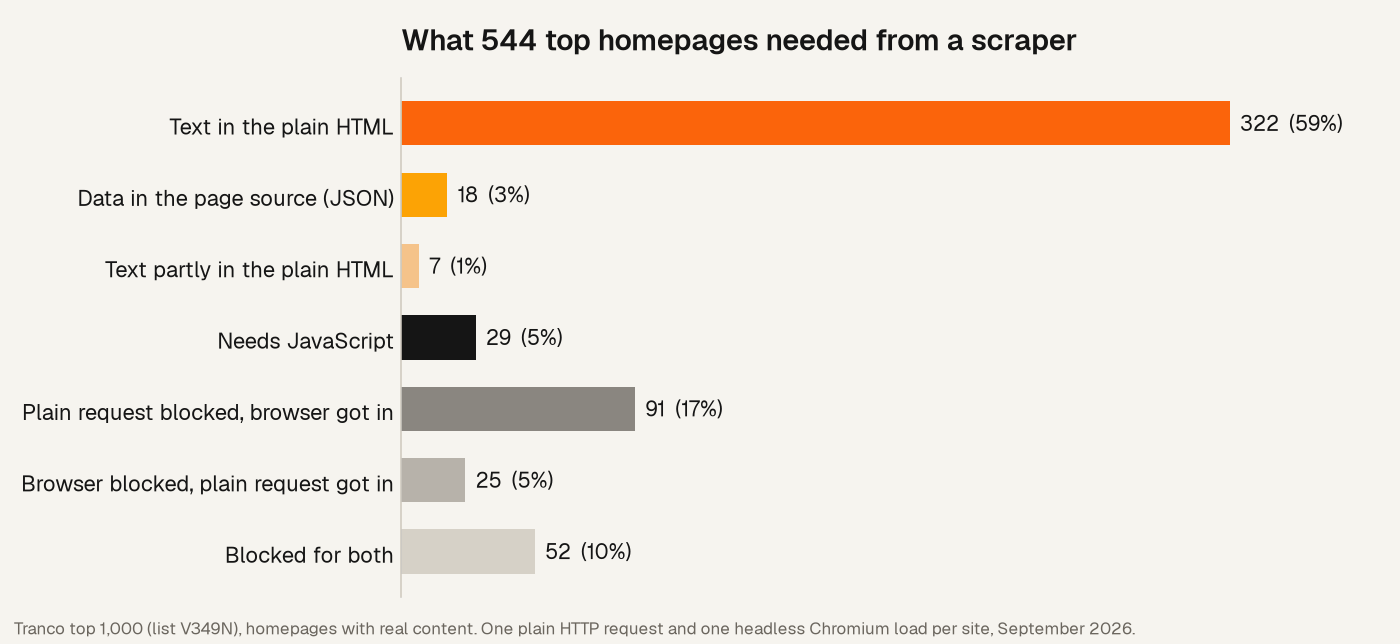
| Result | Homepages | Share |
|---|---|---|
| Text in the plain HTML | 322 | 59% |
| Data in the page source as JSON | 18 | 3% |
| Text partly in the plain HTML | 7 | 1% |
| Needs JavaScript | 29 | 5% |
| Plain request blocked, browser got in | 91 | 17% |
| Browser blocked, plain request got in | 25 | 5% |
| Blocked for both | 52 | 10% |
“Text in the plain HTML” means at least 60% of the words shown in the browser were already in the HTML. Moving that line between 50% and 80% changed this share only from 55% to 61%. The share that needed JavaScript stayed at 5%.
Most pages don’t need JavaScript
On 59% of homepages, the text was already in the HTML the server returned. This included Microsoft, Apple, GitHub, PayPal and Cloudflare.
Another 3% loaded their text with JavaScript, but the same data was already in the page as JSON. Instagram, Uber, weather.com and DuckDuckGo were in this group. A scraper can read that JSON directly, without running any code.
Modern frameworks don’t change this much. 62 homepages were built with Next.js, and 54 of them had their text in the plain HTML. These sites render pages on the server before sending them.
Structured data was common too. 54% of the pages with readable content included JSON-LD, the format sites use to describe products, articles and organizations for search engines. It’s often the cleanest place to find prices, dates and names.
Only 29 homepages, about 5%, really needed JavaScript. Most were apps more than pages, like Spotify, Twitch, Bluesky, Duolingo and iCloud.
Blocking is the real reason to use a browser
On 91 sites, 17% of the total, the plain request was blocked while the browser loaded the page. That’s more than 3 times the number of sites that needed JavaScript.
The blocks came from a few systems.
- Cloudflare challenge pages appeared on 50 of the 91 sites, including OpenAI and Claude.
- Amazon returned a “verify that you’re not a robot” page on every store I tested, including amazon.com, .co.uk, .de and .in.
- Wikipedia returned a 403 status with a message that begins “Please respect our robot policy”.
The Wikipedia case shows what these systems look at. My client sent a Chrome user agent, but its network fingerprint was Python’s, not Chrome’s. A request with the same user agent from curl loaded the page. The block came from the mismatch, not from the missing browser.
A browser can also get you blocked
The reverse happened on 25 sites, about 5%. The plain request got the full page, and the headless browser was blocked. eBay, Zillow, Salesforce, Lowe’s and Mayo Clinic were in this group.
Headless Chromium leaves its own traces, and some anti-bot systems look for them. A browser is a different identity, not a better one.
Some sites block both
52 sites, about 10%, blocked both methods. They included The New York Times, Stack Overflow, Etsy, Tripadvisor and Perplexity. The Times served a DataDome challenge, and Stack Overflow served a Cloudflare one.
For these sites, neither a plain request nor a default headless browser was enough. Access depends on the rest of the setup, like IP reputation, a consistent browser fingerprint and the site’s own terms.
The cost of using a browser
The median plain request took 0.7 seconds. The median browser load took 9.6 seconds, about 14 times longer.
That browser time includes waiting for the page to finish loading, up to about 9 seconds. A tuned scraper can shorten that wait. It can’t remove the cost of starting a browser and running each page’s JavaScript, which is why speakers at OxyCon and Extract Summit described a browser as the last option, not the first.
What this means for your scraper
- Start with a plain request. For most pages, the text is already in the HTML.
- Look for data in the page before you render it. Check for JSON-LD,
__NEXT_DATA__and other JSON in<script>tags. - When a request fails, check why. A 403 with a Cloudflare page is a blocking problem, and a page with no text is a JavaScript problem. They need different fixes.
- Don’t assume a browser will help. It solved 17% of the blocks in this test and caused 5% of them.
- Be consistent about who you are. A client that claims to be Chrome but doesn’t behave like it stands out. Some sites, like Wikipedia, publish rules for bots and ask them to identify themselves.
Limits of this test
- Homepages only. Product, search and article pages often behave differently, and they’re usually what scrapers need.
- One run, from one place. I ran the test once, from Mumbai. Some sites change content and blocking by country and over time.
- One HTTP client and one browser setup. A client with a browser-like network fingerprint, or a browser with different settings, would get different results.
- A word count, not a reading. The test compared words, not meaning. A page that adds translations with JavaScript, like example.com, counts as needing JavaScript even when its main text is in the HTML.
Data and code
Everything is public, so you can check the results or run the test yourself.