Playwright MCP vs Chrome DevTools MCP vs agent-browser: same accuracy, but tokens per task ranged from 4.1K to 95K
I gave the same Claude agent, Claude Opus 5.5, 19 real browser tasks and ran each task twice. I tested 7 setups, Playwright MCP, Chrome DevTools MCP and 5 ways of loading agent-browser. All 7 got every answer right. The difference was in tokens.
The median task read 31K input tokens with Playwright MCP and 46K with Chrome DevTools MCP. With agent-browser, it depended on how the agent loads the tool. It read 6.9K with the short AGENTS.md block from agent-browser’s README, 58K with the skill the README recommends, and 95K as an MCP server. The MCP server’s tool list alone takes 31K tokens, and 26K of them are 14 options that every tool repeats.
In dollars, the setups were closer. With the tool list and system prompt cached, the median task cost under 4 cents in every setup. The totals for 38 tasks ranged from $1.67 to $4.59 for the setups the vendors document, and the gaps between them came mostly from a few tasks where one tool call returned hundreds of thousands of characters. 3 short rules and agent-browser’s output cap brought the total to $0.97.
The tasks ran on real sites like Allbirds, GitHub, PyPI, Stripe’s docs and Hacker News, on October 26, 2026. Each task asked for one fact, such as a price, a stock status, a version number or a headline.
Results
Each setup ran 19 tasks twice, with Playwright MCP 0.0.83, Chrome DevTools MCP 1.12.0 and agent-browser 0.39.3. All 7 setups got all 38 answers right. A 20th task, on IKEA, is left out of the scores, because its product link redirected to a category page on the test day, and the setups handled that differently.
| Setup | Median tokens per task | Most tokens in one task | Median cost per task | Cost for 38 tasks |
|---|---|---|---|---|
| Playwright MCP | 31K | 86K | $0.037 | $2.10 |
| Chrome DevTools MCP | 46K | 251K | $0.025 | $2.32 |
| agent-browser MCP server | 95K | 472K | $0.034 | $4.59 |
| agent-browser CLI + core skill | 58K | 294K | $0.028 | $4.00 |
| agent-browser CLI + AGENTS.md block | 6.9K | 104K | $0.025 | $1.67 |
| agent-browser CLI, tool only | 7.3K | 99K | $0.031 | $2.17 |
| agent-browser CLI + 3 rules + output cap | 4.1K | 72K | $0.017 | $0.97 |
“Tokens” counts every input token the model read across all turns of a task, including the tool definitions and anything read from the cache. Cost uses Claude Opus 5.5 prices, with the tool definitions and system prompt cached once and reused across tasks, the way agents like Claude Code cache them.
The median shows a typical task. The total also includes the few tasks that cost much more, so a setup with a cheap median can still have a high total.
Speed was a tie. The median task took 11 to 12.5 seconds in every setup. Across all tasks, the browser tools took 34% to 45% of the total time, and the model took the rest.
How you load agent-browser decides how many tokens it uses
agent-browser is a CLI. Its README describes 4 ways to use it with an agent. You can let the agent run agent-browser --help, add a short block to AGENTS.md or CLAUDE.md, install the skill (marked “recommended”), or run it as an MCP server. For the CLI setups, I gave the agent one tool that runs any agent-browser command. The tool-only setup is the first way. No agent ran --help in any run. The model already used the right commands without it.
Every turn, the agent reads the tool definitions and the system prompt again. I counted them with Claude’s own token counter.
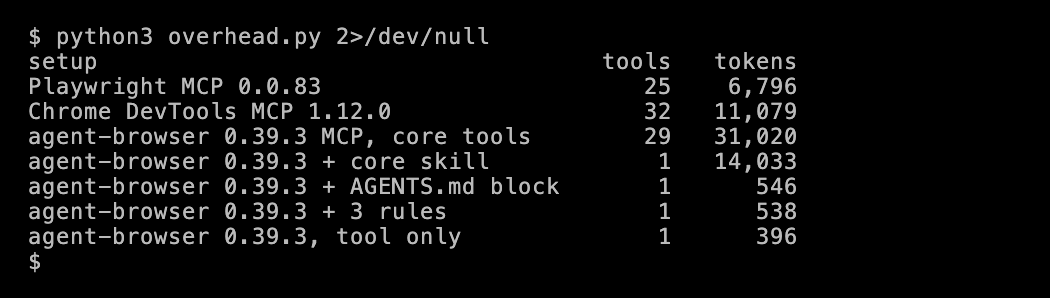
These numbers are higher than in my October 12 count. That post used OpenAI’s o200k_base tokenizer, and this one uses Claude’s count, which includes Claude’s tool-use system prompt. Chrome DevTools MCP also has 2 more tools in version 1.12.0.
The skill. The README’s skill is a short stub that tells the agent to run agent-browser skills get core. That command returns a guide of about 38,600 characters, or 14K tokens. In my test, the guide went straight into the system prompt, so the agent didn’t need the extra call. The median task with the skill took 4 turns, and 4 turns of 14K tokens is 56K. So most of the median 58K input tokens were the skill, read again on each turn. Cached reads cost 5% of the normal input price, which keeps the dollar cost down. But the skill still takes 14K tokens of the context window on every turn, which leaves less room for pages on long tasks.
The AGENTS.md block. The README’s block for AGENTS.md or CLAUDE.md lists 4 steps. Open the page, run snapshot -i, click or fill by ref, and run the snapshot again after a change. The block adds 150 tokens. With it, the median task read 6.9K tokens, the fewest of any setup a vendor documents.
The MCP server. agent-browser mcp lists 29 tools on its default core profile, and they take 31,020 tokens, 4.6 times Playwright MCP’s 25 tools. Most of that is 14 options that every tool repeats.

Most of the 14 options are session and security settings, like allowedDomains, caCert and restore, which usually stay the same for a whole session. Without them, the 29 tools would take 4,898 tokens, less than Playwright MCP. The README already says that global flags belong in the MCP server’s environment, so these could move there too. As it is, a 2-turn task through the MCP server read about 62K tokens, almost all of it the tool list read twice.
What the skill changed
The skill teaches the agent to use snapshot -i, which lists only the interactive elements, and to scope it to a part of the page with -s. With the skill, the agent took no snapshot of the whole page in 38 tasks. With the tool only, it took 10, and with the AGENTS.md block, which also says to use snapshot -i, it took 12.
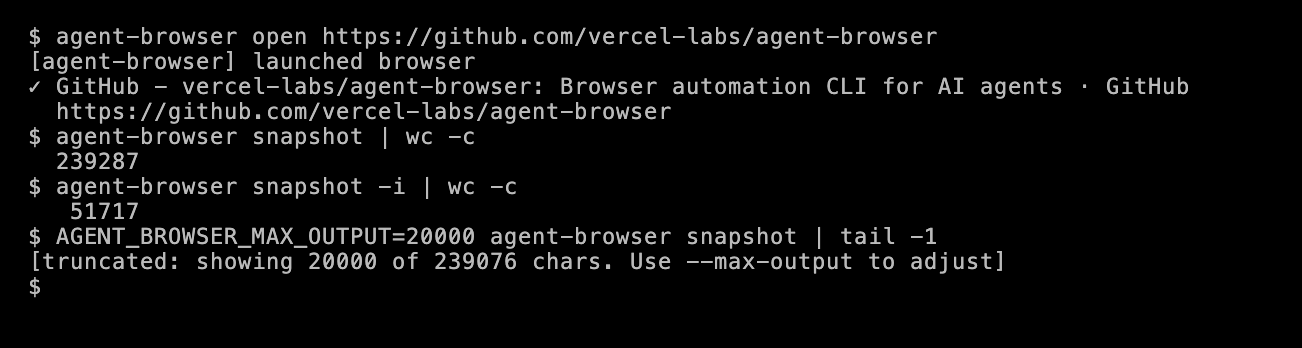
The biggest was on GitHub. On the agent-browser repository page, a whole-page snapshot is about 239,000 characters. Even snapshot -i returns about 52,000 there.
With the skill, the agent made 10 tool errors, against 19 with the tool only and 8 with the AGENTS.md block. 12 of the 19 came from JavaScript passed to eval without quotes, so the command was split into pieces and failed. The agent recovered on a later call each time, and accuracy didn’t change.
The skill didn’t stop every large result. On GitHub, one command it chose returned 426,000 characters. More on that under “What made a task expensive”.
3 rules and an output cap
With the AGENTS.md block, the agent still took 12 whole-page snapshots, and nothing in the block limits a very large result. So I tested one more setup, with 3 rules based on the skill’s text. The skill’s fix for quoting is eval --stdin or base64. My tool sends one command line with no input, so the third rule asks for one quoted argument instead.
agent-browser tips:- Run `snapshot -i` to see interactive elements only, and add `-s "<css selector>"` to scope it. Run it again after the page changes.- Use the @eN refs from the snapshot in commands like `click @e3`, `fill @e3 "text"` and `get text @e3`.- Inline `eval "..."` works only for simple expressions. Put the whole script in one double-quoted argument.I also set AGENT_BROWSER_MAX_OUTPUT=20000, so no single command can return more than 20,000 characters. The cap is off by default.
This setup got 38 of 38 right, with a median of 4.1K tokens per task, the fewest in the test. Its median task cost $0.017, and all 38 tasks cost $0.97, about half of Playwright MCP and a quarter of agent-browser with its skill. The agent took 3 whole-page snapshots, of PyPI’s CAPTCHA page, PyPI’s project page and the capped GitHub page, and made no quoting errors.
The cap fired only twice, both on GitHub. It cut a whole-page snapshot in one run and a snapshot of the main section in the other, each to 20,000 characters. The agent still found the star count. So the cap removed the worst case, and the lower median most likely came from the rules.
I wrote these rules after seeing the other runs, and tested them on the same 19 tasks. So treat this setup as a good starting point to test on your own tasks, not a proven winner.
The skill isn’t wasted. It also covers forms, logins, tabs, parallel sessions, WebMCP tools and troubleshooting, which these tasks didn’t need.
What made a task expensive
The median task cost under 4 cents in every setup. With caching, the tool list and earlier turns are read again at $0.20 per million tokens. But every new token that a tool returns is written to the cache at $5 per million, 25 times more. So a task gets expensive when it pulls a lot of new page content into the conversation. In this test, that came from 2 things.
Many turns on a product page. Picking a size on Allbirds and True Classic took 4 to 11 turns. The median task took 3 or 4. On Allbirds, a popup covered the size buttons, and agents had to close it and try again. Each turn reads everything before it again, so a snapshot taken on turn 3 is read again on every turn after it. Chrome DevTools MCP took 3 snapshots of about 23,000 characters on True Classic, and that task read 251K input tokens over 8 turns. Through agent-browser’s MCP server, the Allbirds size task took 11 turns and read 472K, the most of any task.
One very large tool result. The most expensive task in the test cost $1.46. Through agent-browser’s MCP server, the agent read PyPI’s JSON API with raw set and a filter for “version”. With raw set, the filter didn’t narrow the result, and all 509,000 characters came back.
On GitHub, the agent needed only the star count.
- agent-browser with the skill ran
find text "stars" text, which returned 426,000 characters. That task read about 294K input tokens and cost $1.20 in each of its 2 runs. - Chrome DevTools MCP took a snapshot of the whole page in one of its 2 runs, 260,000 characters, and that run read 176K input tokens.
- Playwright MCP used
browser_findwith a regex, which returned 35,000 characters. Its most expensive task in the whole test read 86K input tokens.
My test script passed every tool result to the model in full, as a plain API agent does. Production agents cap it. Claude Code reads back at most 30,000 characters of Bash output (opens in a new tab) by default, and caps MCP results at 25,000 tokens. Neither Playwright MCP nor Chrome DevTools MCP has a text output cap of its own.
Playwright MCP keeps the page out of the context
Playwright MCP’s browser_navigate doesn’t return the page. It saves the snapshot to a file and returns a short reply with a link to it. The agent then searches the snapshot with browser_find, which returns only the matching parts of the page.
That’s how the agents used it. browser_find was 32% of Playwright MCP calls, and browser_snapshot only 7%. On 15 of the 19 tasks, on the average of its 2 runs, Playwright MCP read fewer tokens than Chrome DevTools MCP, agent-browser’s MCP server and agent-browser with its skill.
Snapshot size alone doesn’t predict this. On the 13 pages that loaded for every tool, agent-browser’s whole-page snapshot was the smallest on 12. Playwright MCP’s had the largest median, 22,800 tokens, against 15,600 for Chrome DevTools MCP and 13,800 for agent-browser. Playwright MCP still read the fewest tokens of the MCP servers. Its agent rarely read a whole snapshot.
In dollars, the picture was different. browser_find returned search snippets of a few thousand characters, so the median Playwright MCP task brought in about 9,600 characters of new tool output. The setups that read pages with short JavaScript brought in 1,500 to 2,500. New content is the expensive part of a cached conversation, so Playwright MCP had the highest median cost per task, $0.037. It also had the smallest worst case of the 3 MCP servers. Its most expensive task cost $0.27, against $0.62 for Chrome DevTools MCP and $1.46 for agent-browser’s MCP server.
GitHub’s Copilot cloud agent comes with Playwright MCP as one of its 2 default MCP servers (opens in a new tab). By default, it can reach only pages on localhost.
Agents ran JavaScript more often than they took snapshots
In every setup, the agent ran JavaScript on the page more often than it took a snapshot. In the Chrome DevTools MCP and agent-browser setups, 27% to 40% of calls ran JavaScript. With Playwright MCP, 13% did. Snapshots were 7% to 23% of calls.
A typical script returned just the fact the task asked for. On Hacker News, the agent with the 3 rules ran this.
agent-browser eval "document.querySelector('.athing .titleline a').innerText + ' | ' + document.querySelector('.score').innerText"It got back 77 characters, under 30 tokens, with the top story’s title and its points. agent-browser’s snapshot of the same page is about 10,000 tokens. In 7 of the 14 Allbirds price runs, the agent read the price from the page’s structured data, the og:price:amount meta tag or the JSON-LD block, the same data a scraper would read.
Agents skipped the search box
I gave 5 tasks that asked the agent to use the site’s search or sort menu, on Python’s docs, MDN, PyPI, GitHub and Hugging Face. In 62 of those 70 runs, the agent opened the results page directly, with a URL like docs.python.org/3/search.html?q=asyncio.TaskGroup or huggingface.co/models?sort=downloads. Every setup did this.
It’s what a scraper would do, and it takes fewer steps. But the agents didn’t follow the exact instruction, and a benchmark built from “use the search box” tasks may not test clicking and typing at all. To test UI work, pick tasks with no URL shortcut, like the size pickers in this test.
Blocks were the same for every tool
Before running the agents, I loaded 20 pages with each tool from my home connection in Mumbai. Of those, 6 blocked all 3 tools in headless Chrome. They were npm, Stack Overflow, Zillow, Etsy, OpenAI’s pricing page and IMDb, and they returned 403 errors, bot checks or CAPTCHAs.
During the agent runs, PyPI’s search showed a CAPTCHA or a challenge page in 13 of 14 runs. In all 13, the agent said so in its answer and got the version from the project page or PyPI’s JSON API instead. None tried to solve the CAPTCHA.
In this test, the choice of MCP server or CLI didn’t change which sites blocked. All of them drive headless Chrome. Teams that need those sites put a better browser and better IPs under the agent, through a hosted browser or an unblocking API.
What to run
If your agent connects to tools over MCP, I’d start with Playwright MCP. It read the fewest tokens of the 3 MCP servers, and its worst task was the smallest, at 86K tokens and $0.27. That made its bill the most predictable, and it had the lowest total of the MCP servers, $2.10 for 38 tasks. It needed no extra instructions. Its file-based snapshots and browser_find kept pages out of the context on their own.
If your agent has a shell, as in Claude Code or Codex, the agent-browser CLI with the README’s AGENTS.md block read the fewest tokens of any documented setup, a median of 6.9K, and cost $1.67 for 38 tasks. Add a rule for quoting eval and set AGENT_BROWSER_MAX_OUTPUT. The full skill also covers logins, tabs and sessions, which this test didn’t need.
Chrome DevTools MCP was in the middle on these tasks. Its median task was among the cheapest, but one uncapped snapshot on GitHub made its worst task cost $0.62. Its strengths are tools this test didn’t use, like performance traces, Lighthouse audits, network requests and console messages. If your agent debugs a site, that’s the tool built for it.
Whatever you run:
- Cache the tool definitions and system prompt across tasks. In this test, that cut the cost of the 4 setups with large fixed context by 36% to 53%.
- Cap tool output. With the skill, the GitHub task cost $1.20 because of one uncapped result, while the median task cost under 3 cents. Claude Code caps output by default. An agent you build on the API needs its own cap.
- Watch tasks with many turns, like picking a size on a product page. Each turn reads everything before it again.
Test setup and limits
- Agent. Claude Opus 5.5 with effort set to medium, up to 30 turns per task, and the same short system prompt for every setup. The agent loop is my own Python script that calls the Messages API, not Claude Code, and it doesn’t cap tool output.
- Tools. Playwright MCP 0.0.83 and Chrome DevTools MCP 1.12.0, both headless and isolated. agent-browser 0.39.3 as an MCP server on its default profile, and as a CLI through one tool, with a new session for every task. The installed Chrome 155 on macOS, from Mumbai on a home connection.
- Grading. By hand, against the page. For pages that change, like Hacker News, I checked the answer against the page text that the agent saw in that run. The first run with the skill didn’t log page text, so I checked its answers against other runs a few minutes apart.
- Cost. Claude Opus 5.5 prices per million tokens are $4 for input, $5 for cache writes, $0.20 for cache reads and $20 for output. In my runs, the cache was empty at the start of each task, so each new task wrote the tool definitions and the skill to the cache again. I then ran a few tasks with the tool definitions and system prompt cached across tasks, confirmed that later tasks read them from the cache, and used that to recompute the costs in the table. As run, the totals were $3.27 for Playwright MCP, $4.23 for Chrome DevTools MCP, $9.80 for agent-browser’s MCP server, $6.42 with the skill, $1.76 with the AGENTS.md block and $1.01 with the 3 rules. The tool-only prompt is below Claude’s 512-token minimum for caching, so its cost didn’t change.
- Limits. 19 tasks, 2 runs each, 1 model and 1 day. Each task asked for one fact from public pages. Long tasks, logins and forms with many steps weren’t tested, and those may favor a different setup. 4 agent-browser setups (tool only, AGENTS.md block, 3 rules and MCP server) ran up to about 75 minutes after the others on the same day, so pages that change, like Hacker News, showed different stories.
Data and code
- Every agent run, with each turn’s tokens, each tool call and the final answer, and the tasks
- The agent script and the summary script, which rebuilds every number in the results table from
runs.json, with its output - The token count script, its output and the shared options script
- The VHS scripts that ran the commands in the terminal images above, in a real shell, with the tape for the token count, the shared options and the GitHub page
- Snapshot sizes for the 20 pages, with the page list and the scripts that loaded the pages and counted the tokens