Shopify's catalog for AI agents returns the page price, but hides sold-out sizes by default
Shopify’s docs say every store serves a product catalog for AI agents, and all 34 stores I checked did. It follows the Universal Commerce Protocol (opens in a new tab) (UCP), which Shopify built with Google. There’s no API key. The agent sends the URL of its profile, a small JSON file that lists the protocol version and the capabilities it uses. The store answers with prices, stock and checkout links.
Teams that monitor Shopify prices have read each store’s /products/<handle>.js or products.json for years. Neither was built for agents. UCP is built for them.
I tested UCP on 34 Shopify stores on October 24, 2026. Every price I could check matched the product page and the store’s own data. When sold-out sizes were requested, stock matched too, for all 50 sizes I checked. Each answer was 9 to 40 KB, compared with 0.4 to 6.4 MB for the page HTML.
Still, 3 defaults can give a data team missing or wrong data. Sold-out sizes are missing unless you ask for them. The cross-store Global Catalog returns each price in the seller’s currency. And anonymous calls, with no token or signature, stopped at about 100 per store per hour from my IP address.
How to call a store
Each store lists its UCP endpoint and capabilities at /.well-known/ucp. All 34 stores in the test had one. Walmart, Target, Amazon, Etsy, Wayfair and Home Depot didn’t, and returned 404 or 503.
The endpoint is an MCP (Model Context Protocol) server, but you don’t need an MCP client. A plain JSON-RPC POST works, as long as it carries your profile URL in meta.ucp-agent.profile.
The profile used in this test declares only catalog capabilities, for search and lookup on single stores and in the Global Catalog. Host your own copy on your domain. The store sees that URL on every call, so it names your agent, and you control what it declares. Without a token or signature, Shopify still counts the call as anonymous.
curl -s https://doccraft.dev/ucp/agent-profile.json | jq -c '.ucp | {version, capabilities: (.capabilities | keys)}'{"version":"2026-08-25","capabilities":["dev.shopify.catalog","dev.shopify.catalog.global","dev.ucp.shopping.catalog.lookup","dev.ucp.shopping.catalog.search"]}A catalog search with that profile looks like this.
curl -s https://misen.com/api/ucp/mcp \ -H "Content-Type: application/json" \ -d '{"jsonrpc": "2.0", "id": 1, "method": "tools/call", "params": {"name": "search_catalog", "arguments": { "meta": {"ucp-agent": {"profile": "https://doccraft.dev/ucp/agent-profile.json"}}, "catalog": {"query": "carbon steel wok", "pagination": {"limit": 2}}}}}' \ | jq -c '.result.structuredContent.products[] | {title, price: .variants[0].price, available: .variants[0].availability.available}'{"title":"12\" Pre-Seasoned Carbon Steel Wok","price":{"amount":14400,"currency":"USD"},"available":true}{"title":"10\" Carbon Nonstick™ Wok","price":{"amount":11900,"currency":"USD"},"available":true}Prices are in minor units, so 14400 is $144.00. When a store sets a compare-at price, the crossed-out one, each variant also carries it as list_price. On the True Classic chinos below, it was $129.98, the same as the page. The other catalog tools are lookup_catalog, which takes up to 10 IDs per call, and get_product. If the store can’t fetch your profile, it answers profile_unreachable.
Results
30 of the 34 products could be compared. 2 had been removed or renamed, and the 2 headless stores have no .js data to compare with.
| Check | Result |
|---|---|
Stores that publish /.well-known/ucp | 34 of 34 |
| Price, compared with the page’s JSON-LD | 22 of 22 matched. The other 8 pages had no price there |
Price, compared with the store’s .js data | 30 of 30 matched |
Stock, sold-out sizes included, compared with the .js data | 50 of 50 sizes matched, on 5 stores |
| Median response time, 30 products | UCP lookup_catalog 365 ms, .js 207 ms, page HTML 774 ms |
| Response size, uncompressed | UCP 9 to 40 KB, .js 3 to 31 KB, page HTML 0.4 to 6.4 MB |
The .js data and UCP come from the same store, so the page’s JSON-LD is the more independent check. A UCP answer is larger because MCP sends the data twice, once as text and once as JSON. The .js endpoint is also faster, and it returns every variant in one call. UCP wins in 3 places.
Where UCP helps
Headless stores
SKIMS and Nomad run custom storefronts on Oxygen, Shopify’s hosting for headless stores. Their pages answer with powered-by: Shopify, Oxygen, and their .js and products.json endpoints return 400, 404 or a redirect. UCP still answered for both, and search_catalog found the exact products.
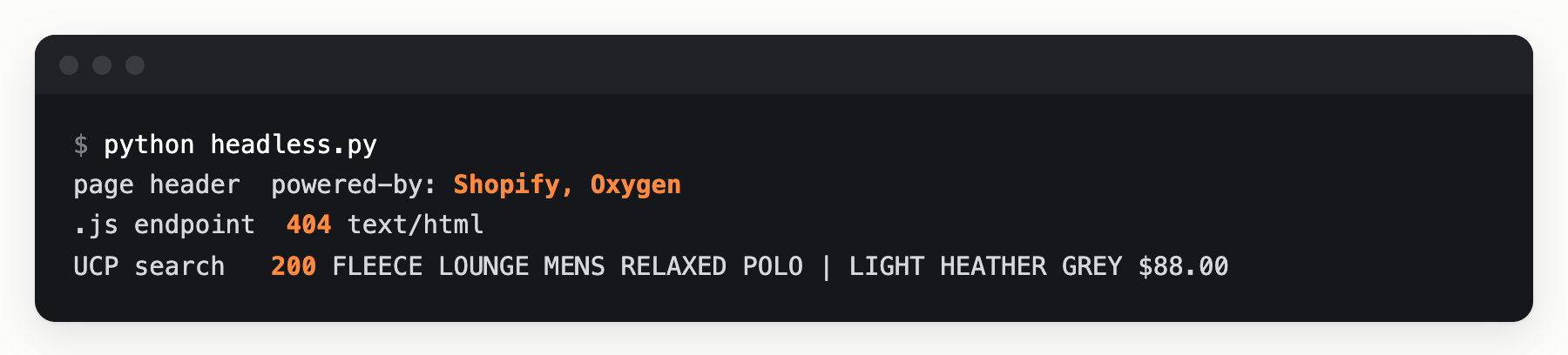
Headless stores can also be read through the Storefront GraphQL API, with the public token their pages load. UCP needs no token.
Prices for other countries
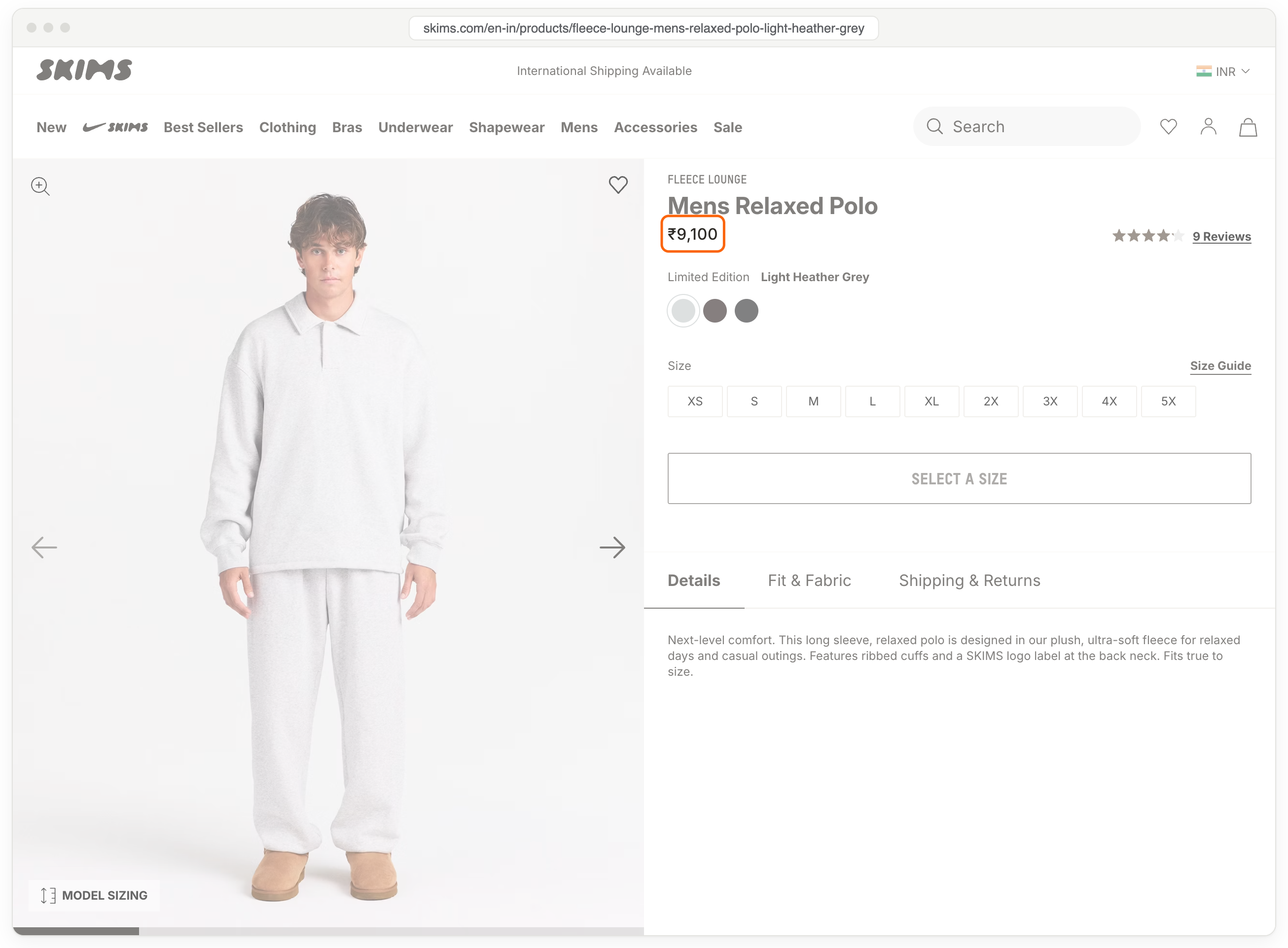
search_catalog takes the buyer’s country and currency in context, for example "context": {"address_country": "GB", "currency": "GBP"}. The same search for 4 countries, sent from Mumbai, returned each store’s local price.
| Store | US | UK | India | Germany |
|---|---|---|---|---|
| SKIMS | $88 | £94 | ₹9,100 | €112 |
| Kith | $75 | £72 | ₹7,400 | €91 |
| Allbirds | $25 | $25 | $25 | $25 |
I checked 2 of these prices with the stores. Kith’s .js endpoint returned the same £72 with a UK localization cookie, and the SKIMS page for India shows ₹9,100. Allbirds stays in dollars because it runs a separate Shopify store for each country.
One request across stores
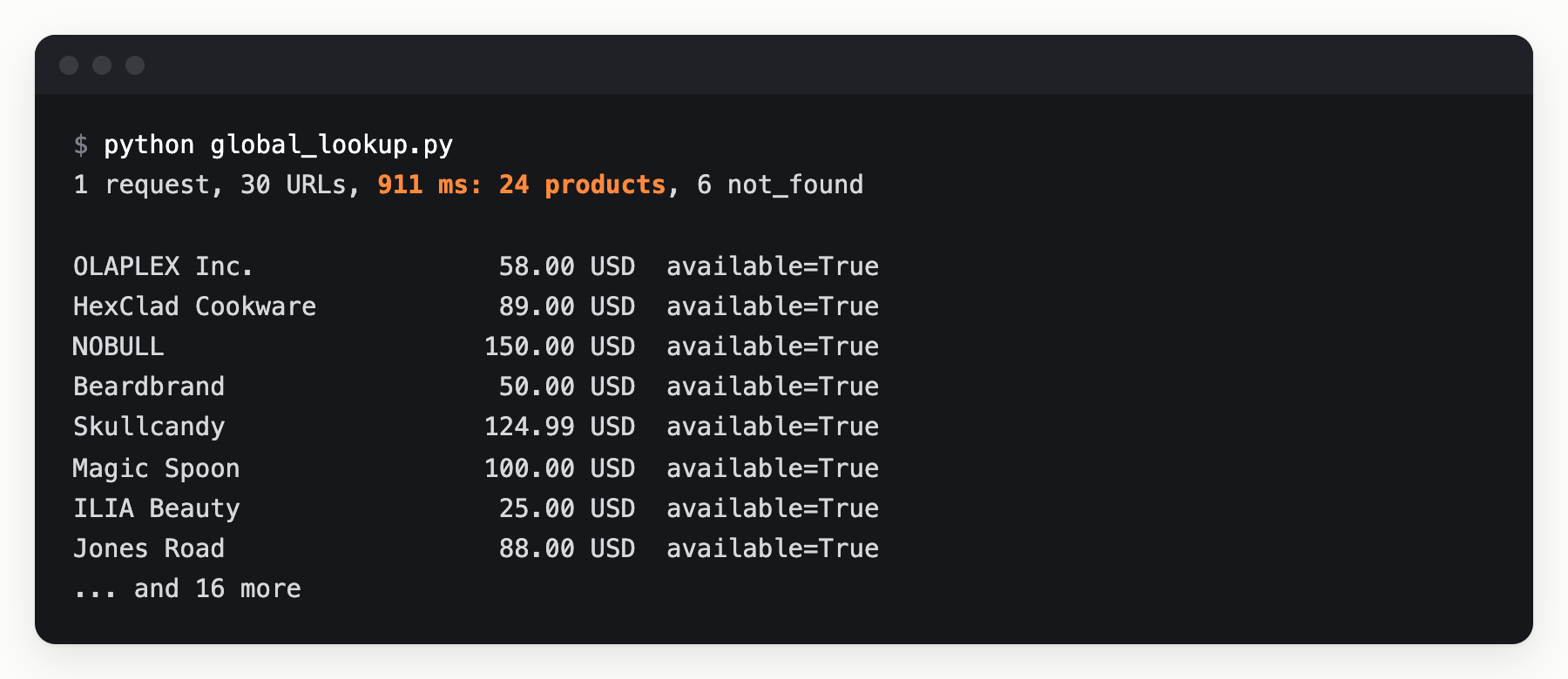
Shopify’s Global Catalog (opens in a new tab) at catalog.shopify.com/api/ucp/mcp searches across stores, and its lookup_catalog takes up to 50 product URLs per call. One call with all 30 URLs returned 24 products from 24 stores in under a second, each with its seller and one variant’s price and stock. All 24 matched the stores’ .js data. The other 6 came back not_found. Shopify’s docs limit the Global Catalog to eligible merchants and don’t list the rules.
Anonymous calls to this endpoint share one rate limit with all other anonymous traffic. Shopify’s rate-limit docs (opens in a new tab) say it plainly, “Don’t use unauthenticated requests for production traffic”.
3 defaults that can give you missing or wrong data
All 3 make sense for a shopping agent. For a data team, the first 2 change the data without an error, and the third stops the crawl.
Sold-out sizes are missing
A lookup of 10 True Classic chino variants returned 3. The other 7 were exactly the sizes that the .js endpoint lists as sold out, and the response didn’t mention them.
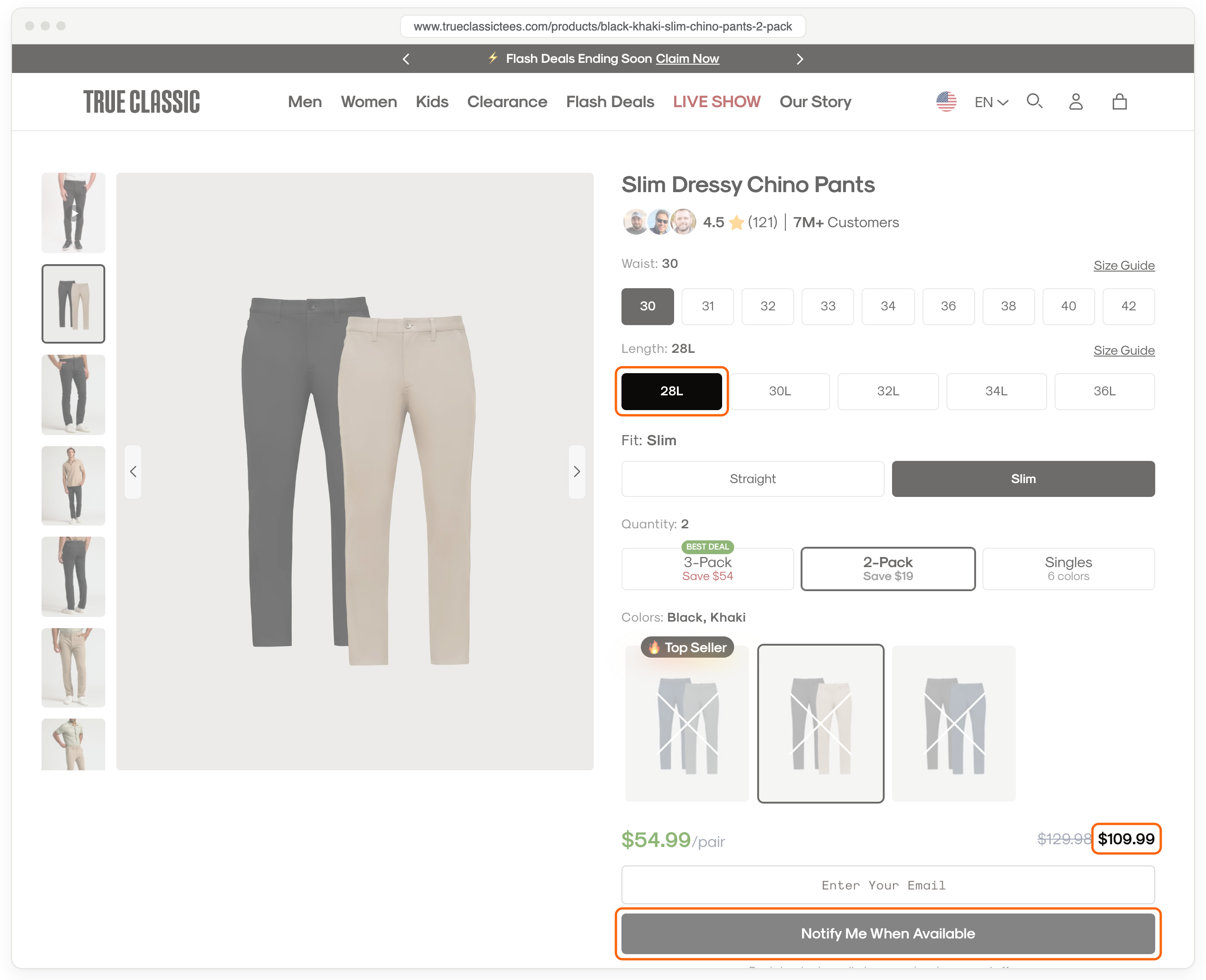
The cause is the available filter, which Shopify describes as “Default true (only sale-ready items)”. For a shopping agent, that’s the right default. For stock monitoring, a sold-out size looks the same as a size that doesn’t exist.
import httpx
STORE = "https://www.trueclassictees.com"PROFILE = "https://doccraft.dev/ucp/agent-profile.json"
def lookup(ids, **filters):    catalog = {"ids": ids}    if filters:        catalog["filters"] = filters    body = {"jsonrpc": "2.0", "id": 1, "method": "tools/call",            "params": {"name": "lookup_catalog", "arguments": {                "meta": {"ucp-agent": {"profile": PROFILE}}, "catalog": catalog}}}    r = httpx.post(f"{STORE}/api/ucp/mcp", json=body, timeout=30)    products = r.json()["result"]["structuredContent"]["products"]    return [v for p in products for v in p["variants"]]
# The first 10 variants of one product, from the store's own product dataproduct = httpx.get(f"{STORE}/products/black-khaki-slim-chino-pants-2-pack.js").json()ids = [f"gid://shopify/ProductVariant/{v['id']}" for v in product["variants"][:10]]
default = lookup(ids)everything = lookup(ids, available=False)print("Default:          ", len(default), "of", len(ids), "variants")print("available=false:  ", len(everything), "of", len(ids), "variants")for v in everything[:4]:    print(f"  {v['title']:<12} ${v['price']['amount'] / 100:.2f}  available={v['availability']['available']}")
Default: 3 of 10 variantsavailable=false: 10 of 10 variants 30 / 28L $109.99 available=False 30 / 30L $109.99 available=True 30 / 32L $109.99 available=True 30 / 34L $109.99 available=FalseWith available set to false, all 50 variants checked across 5 stores matched the .js data, sold-out sizes included. The Global Catalog has the same default. A lookup of 10 Outdoor Voices variants there returned 6, and all 10 with available set to false. To read every size, look up variant IDs. A lookup by product ID returned just 1 variant, even with available set to false.
On a headless store, there’s no .js endpoint to get the IDs from. There, get the product ID from search_catalog, which also lists the product’s options and their values. Then call get_product with one option value selected and available set to false. It returns every variant with that value. The catalog part of the call looks like this.
{ "id": "gid://shopify/Product/10246876987745", "selected": [{"name": "Color", "label": "LIGHT HEATHER GREY"}], "filters": {"available": false}}On SKIMS, this call returned all 9 sizes of the polo, because SKIMS lists each color as its own product. In UCP, the True Classic chinos have 2 options, 9 waists and 5 lengths, so they would take 9 calls, one per waist.
Global Catalog prices come in the seller’s currency
A single store’s endpoint returned local prices, as shown above. The Global Catalog doesn’t convert prices, even when the buyer’s currency is set to USD. A search for “CeraVe moisturizing cream” for a buyer in the US returned 6 prices in USD. The other 4 came from stores in Qatar, Kenya, India and Oman, in their own currencies.
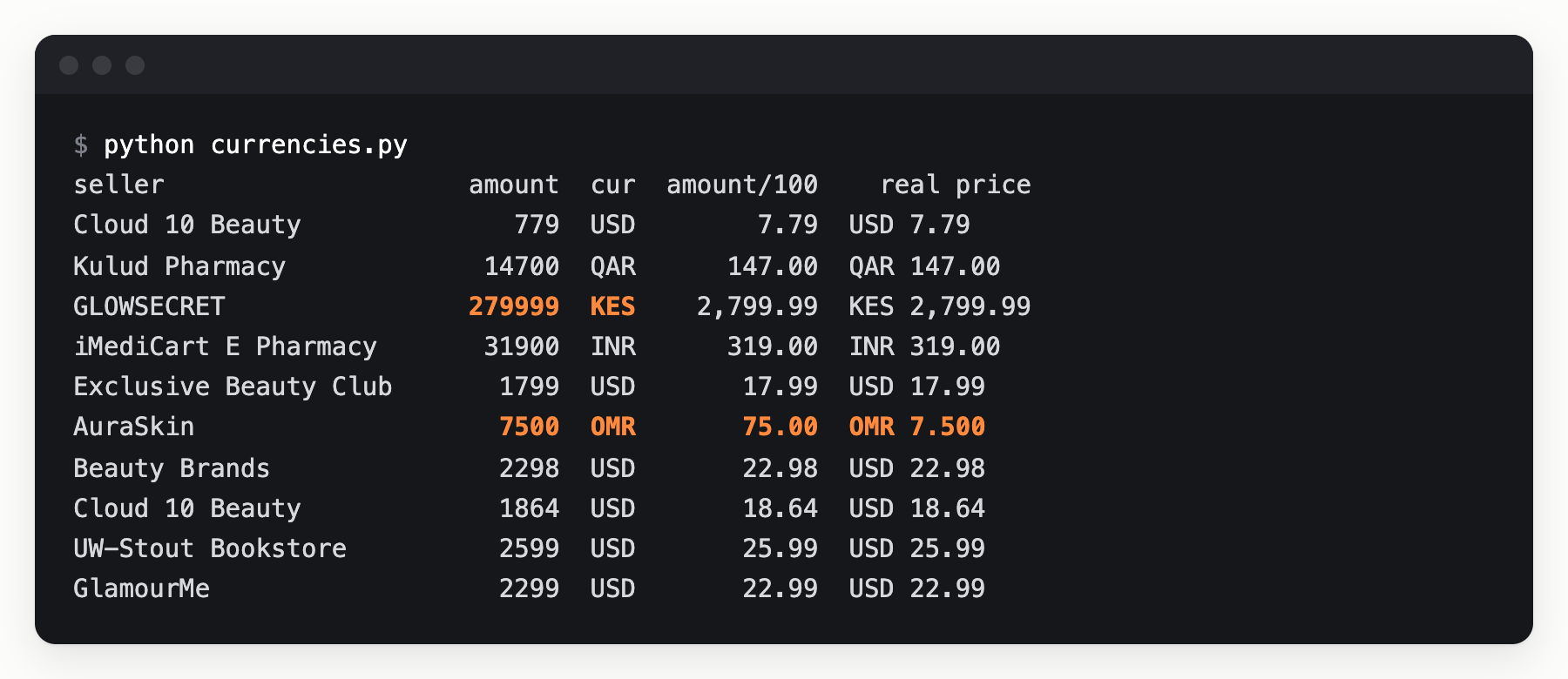
Each amount is an integer in the currency’s minor units. A pipeline that ignores currency would compare KES 2,799.99 with $7.79 as if both were dollars.
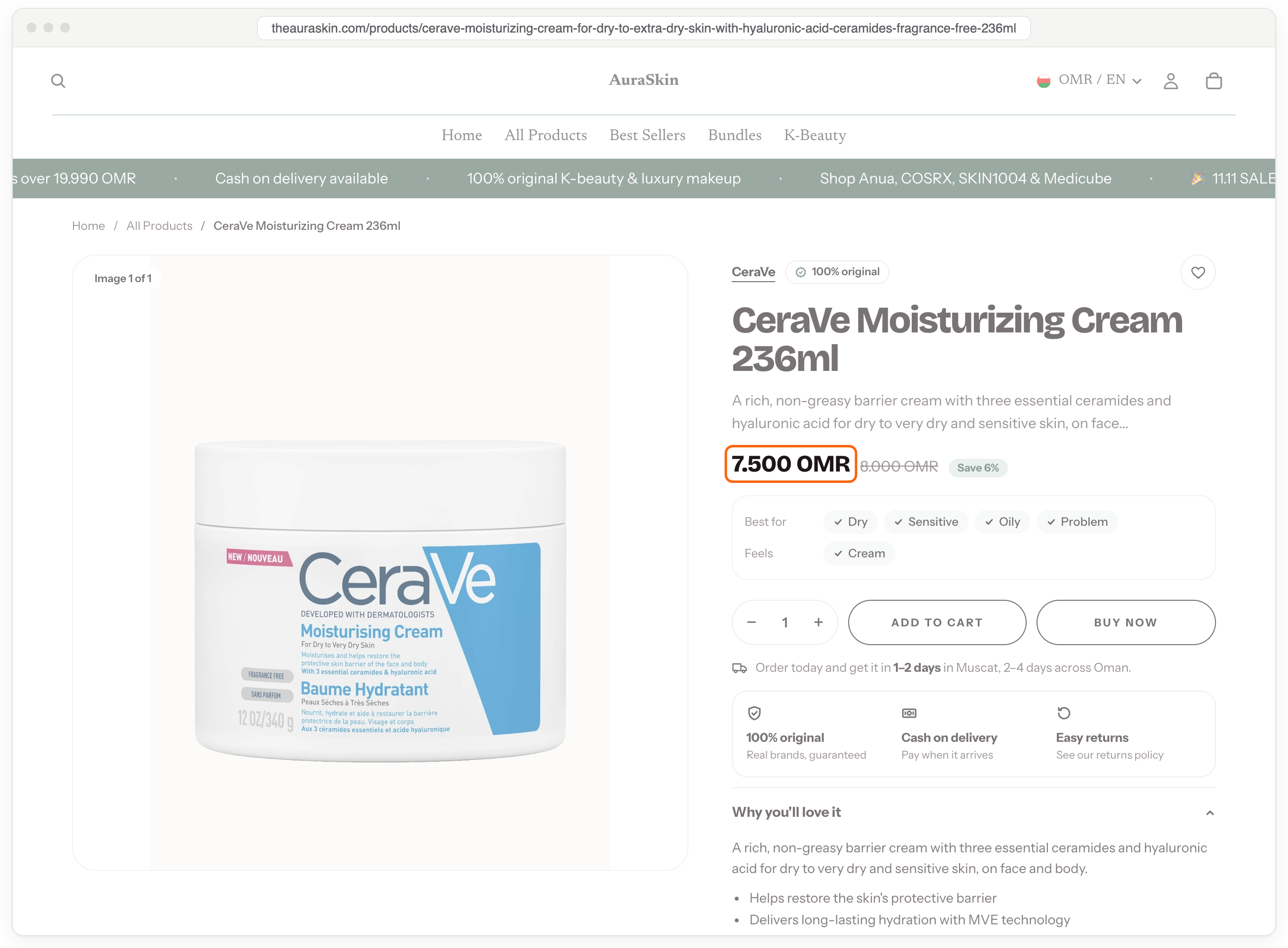
Dividing by 100 fails too. The Omani rial has 3 decimal places, so 7500 OMR is OMR 7.500, not 75. Shopify’s descriptions of its MCP tools, which each endpoint returns in its tool list, cover 2-decimal and 0-decimal currencies, but not 3-decimal ones.
Anonymous calls stopped at about 100 per store per hour
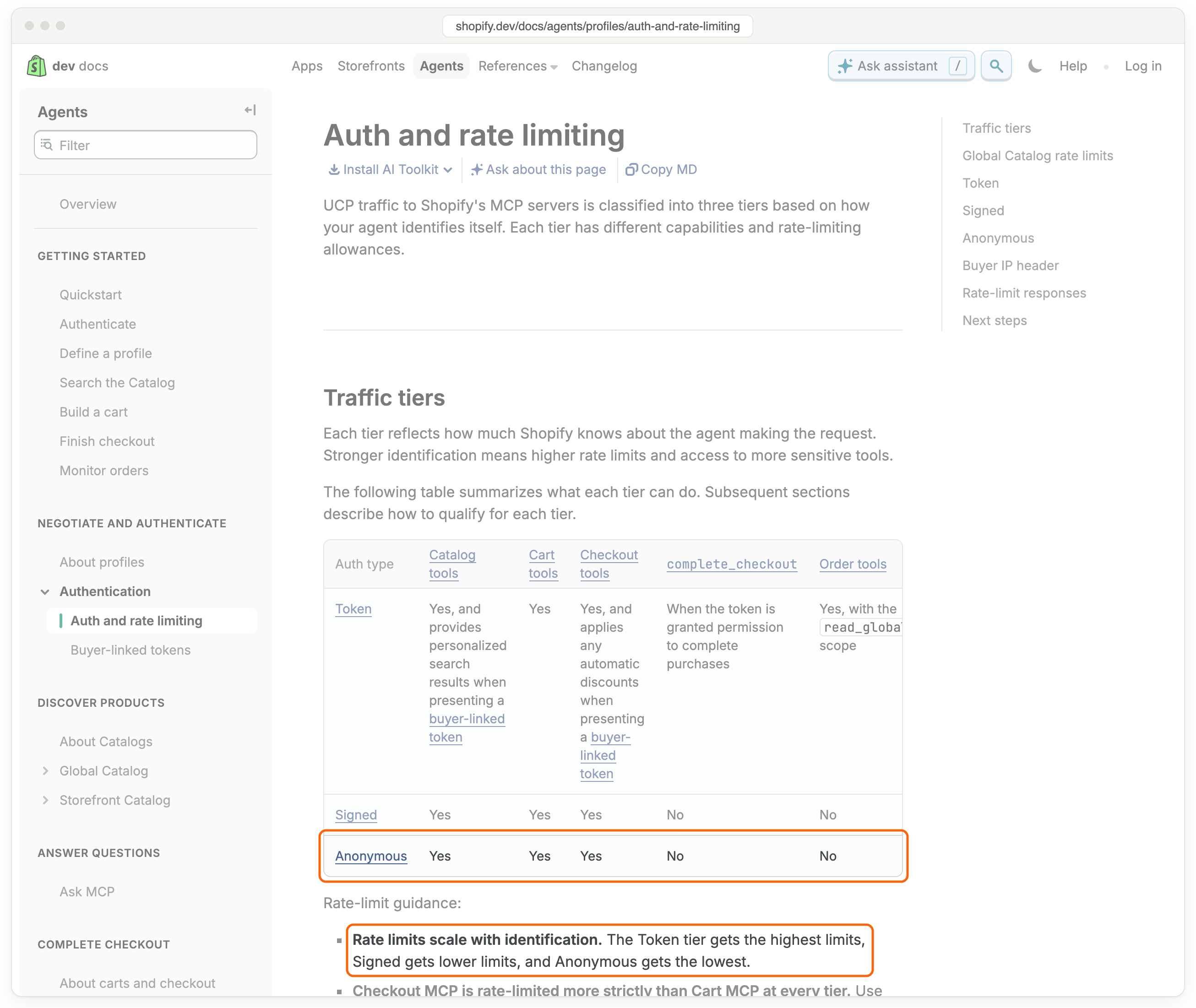
Shopify sets UCP rate limits by identity. Calls with a Shopify token get the highest limits, signed calls get lower ones, and anonymous calls get the lowest.
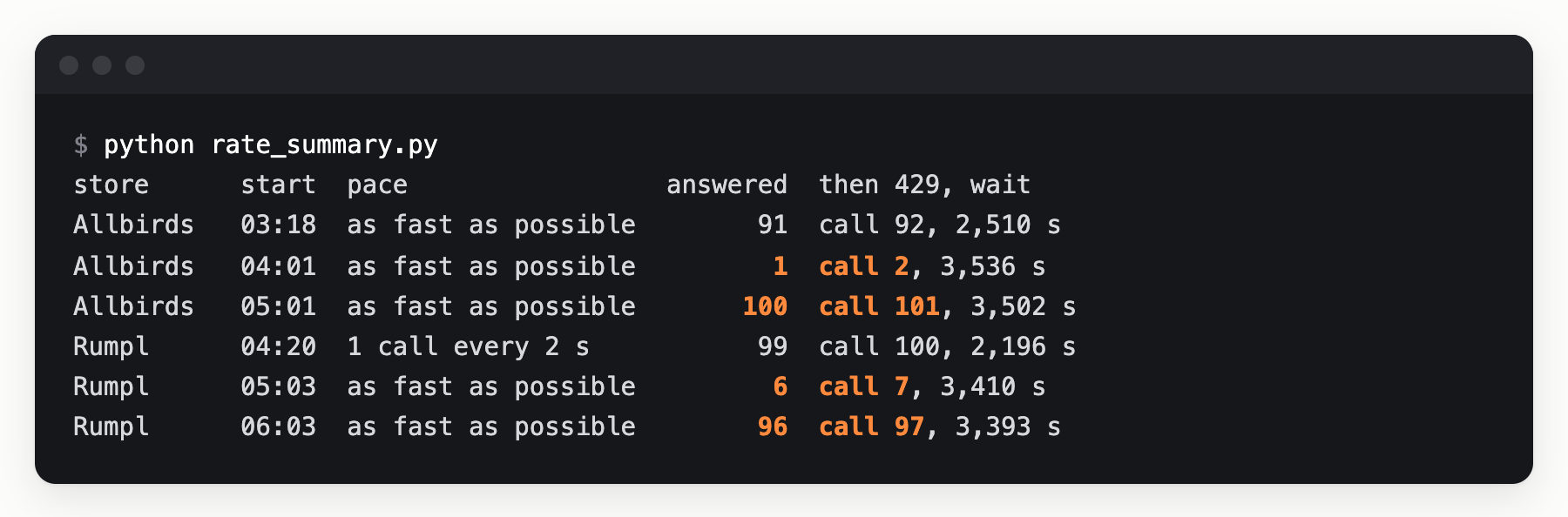
From one IP address, anonymous calls stopped at about 100 per store per hour, and spacing calls 2 seconds apart didn’t raise the limit. At 05:01 UTC, Allbirds answered exactly 100 calls, and call 101 returned 429. Rumpl answered 99 calls sent 2 seconds apart, after 1 earlier call that hour. Every Retry-After ended at the top of an hour. While one store was blocked, the others kept answering, and a second profile from the same IP address got the same 429. So the count is per store, not per profile. I didn’t test other IP addresses.
Going over 100 cost more than the rest of the hour. In the next hour, Allbirds answered only 1 call and Rumpl 6 before another 429. That second 429 didn’t extend the penalty. The hour after that, Allbirds answered 100 calls and Rumpl 96. I sent no calls to Rumpl during its block, so this wasn’t caused by retrying too early.
At 10 variant IDs per call, about 100 calls cover about 1,000 variants per store per hour. For more, Shopify offers a token (opens in a new tab), from an API key in its Dev Dashboard, or signed calls (opens in a new tab), with a key published in your profile.
What to run
On stores that use a Shopify theme, I’d keep the .js endpoint as the main read. It’s faster and returns every variant in one call. I’d use UCP for headless stores, and for agents that need one interface across stores. Outside Shopify, product data still comes from the pages.
When you read through UCP:
- Host your own profile. The store offers tools based on the capabilities your profile declares, so declare only the ones you use.
- Set
availabletofalsewhen you look up variants for stock. - Look up variant IDs, 10 per call, instead of product IDs.
- Store
currencywith everyamount, and use each currency’s decimal places from ISO 4217. - For production volume, get a token. Without one, stay well under 100 calls per store per hour, because going over cost most of the next hour too. On a 429, stop calling that store until
Retry-Afterends.
Test setup and limits
- Stores. One product page from each of 34 Shopify stores that brands run themselves, like Allbirds, SKIMS, Kith and Stanley. They’re the same stores as my Clairic test.
- Setup. Mumbai, a home connection, Python 3.14 and httpx 0.28, one request at a time. Every call sent this profile, which declares only catalog search and lookup. The calls had no token or signature, so they were anonymous.
- Checks. UCP and
.jsboth come from the store’s own data. So each price was also checked against the page’s JSON-LD, where the page had one. - Limits. 1 day and 1 location. The rate limit was measured on 2 stores from 1 IP address. It wasn’t measured on the Global Catalog, which has a separate limit in Shopify’s docs. I didn’t measure limits on the
.jsendpoint.
If you want the store list, the results or the scripts, email me and I’ll share them.