Best headless browser for AI agents: Chrome, Lightpanda and Obscura tested on 50 real pages
For an AI agent that has to see a page the way a person does, Chrome is still the safe default. Lightpanda is the one to use when memory is the limit, with Chrome as the fallback for the pages it can’t render. Obscura 0.2.5 isn’t ready for agent work.
I ran all 3 through agent-browser 0.39.3, Vercel’s command-line browser for AI agents, on 50 real pages, twice, on October 28, 2026. On the 41 pages that Chrome rendered in both runs, Lightpanda 1.0.2 matched Chrome’s text on 33. Obscura 0.2.5 matched on 26 and returned an empty page on 11. On the pages all 3 rendered, Chrome used a median of 1,636 MB of memory, Lightpanda 120 MB and Obscura 252 MB.
Then Claude ran 10 tasks on each engine. It got every answer right on all 3, so the differences are in memory, failed calls and time, not in the answers.
Why the browser engine matters for agents
An agent that reads the web runs a browser for every session. With one Chrome per session, as in this test, that was more than 1.5 GB each, so memory decides how many sessions one machine can run. Sharing one Chrome across sessions uses less memory, but then one crash or memory leak affects every session. Lighter engines like Lightpanda and Obscura promise the same pages with a fraction of the memory. They aren’t built on Chromium, so the question is how many real pages they get right. The test used 50 pages that need JavaScript, from shops, web apps, docs, news, data sites like PyPI and Hugging Face, and travel sites.
Which pages each engine rendered
Each engine’s page was compared with Chrome’s by how much of Chrome’s text it contained, the same metric as in the Lightpanda test. 9 of the 50 pages blocked Chrome in at least one run, so the comparison covers the other 41.
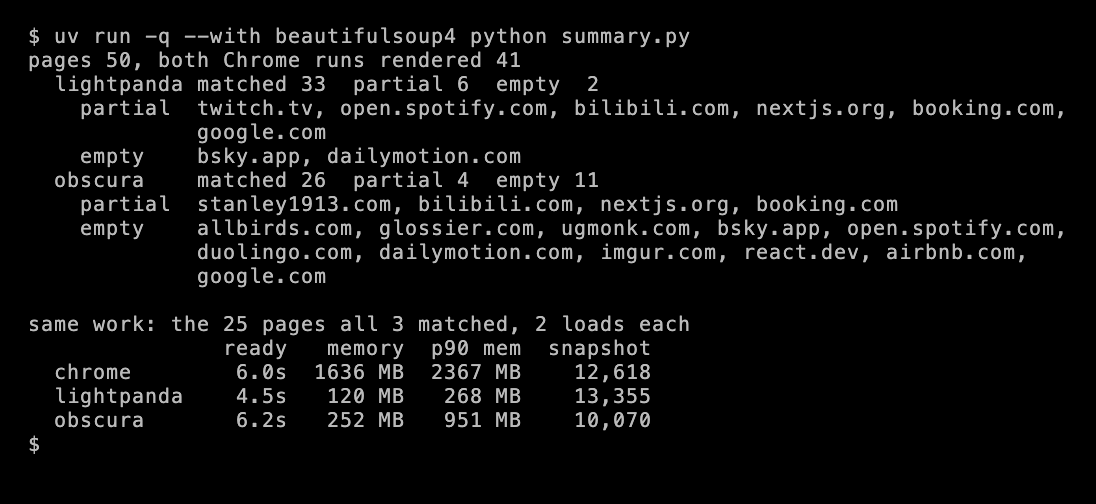
Lightpanda got most pages right. It missed part of the page on 6, mostly JavaScript-heavy apps like Twitch, Bilibili and Booking, where it got about 60% of Chrome’s text. On Google Maps, it got only 13%. It returned an empty page on Bluesky and Dailymotion.
Obscura failed more often, and in more ways. On 2 shops, the command to open the page got no response for 30 seconds. On react.dev, it returned an embedded code sandbox instead of the page. On 6 others, including Allbirds, Spotify and Airbnb, it returned little or no text. On Duolingo and Google Maps, it got an error page from the site. agent-browser’s own README says Obscura “has accessibility, iframe, and rendering limitations; use Chrome when fidelity matters”, and these results fit that.
Some differences don’t appear in the text at all. On MDN’s Fetch API page, Chrome’s accessibility snapshot, the page content agent-browser gives the agent, included the browser compatibility table, and the other 2 didn’t. MDN builds that table inside a web component’s shadow DOM, which isn’t part of the page’s HTML, and my text check counted MDN as a match for all 3. The agent would still have missed the table on Lightpanda and Obscura.
Speed and memory on the 25 pages all 3 rendered
An engine that returns an empty page finishes fast, so a median over all pages would make the engine that fails most look fastest. The numbers below cover only the 25 pages that all 3 engines got right.
| Engine | Time to network idle | Memory, median | Memory, 90th percentile | Snapshot size |
|---|---|---|---|---|
| Chrome 156 | 6.0 s | 1,636 MB | 2,367 MB | 12,618 characters |
| Lightpanda 1.0.2 | 4.5 s | 120 MB | 268 MB | 13,355 characters |
| Obscura 0.2.5 | 6.2 s | 252 MB | 951 MB | 10,070 characters |
Memory is the real difference. Chrome runs a separate process for the browser, the GPU, the network and each site on the page, including ad and tracking frames, and the numbers count all of them. Lightpanda runs as one process.
Speed is a smaller difference. Lightpanda’s README says it’s “16x lighter and 9x faster than Chromium”, and Obscura’s lists 85 ms page loads against about 500 ms for headless Chrome. Both come from the projects’ own test pages. On real pages, much of the load time is likely spent waiting on the network, which no engine makes faster.
What Claude did on each engine
Claude Opus 5.5 ran the same 10 tasks on each engine, twice. Each asked for one fact, like a price on Allbirds, whether a size is sold out on True Classic, or the latest httpx release on PyPI. Some needed a search, a sort or a click on a link.
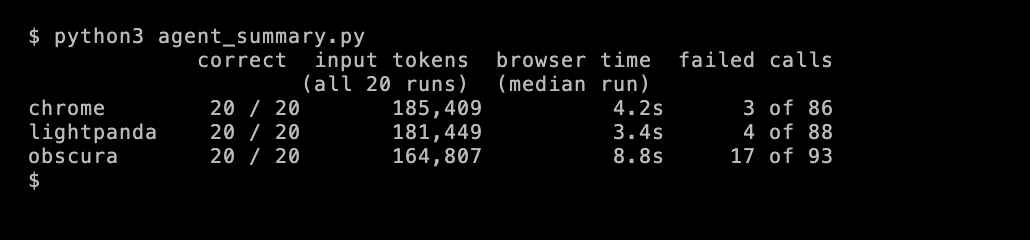
A lighter engine doesn’t make the agent cheaper. The agent’s tokens come from the page text it reads, and Lightpanda gave it about as much text as Chrome did. Over the 20 runs on each engine, the token totals were about 12% apart at most.
Obscura made the agent work harder. It had 17 failed calls, against 3 on Chrome and 4 on Lightpanda. Some pages didn’t respond, and some clicks failed in ways that didn’t happen on the other engines. Time spent in browser calls had a median of 8.8 seconds a run, against 4.2 on Chrome.
The agent still answered on empty pages. On Allbirds, Obscura returned an empty page in both runs, and Claude still answered $50. In one run, it read the price from the page’s Open Graph meta tag. In the other, it noticed the page’s address had changed to Meta’s tracking pixel, and it opened Shopify’s product JSON instead, the same URL with .js added.
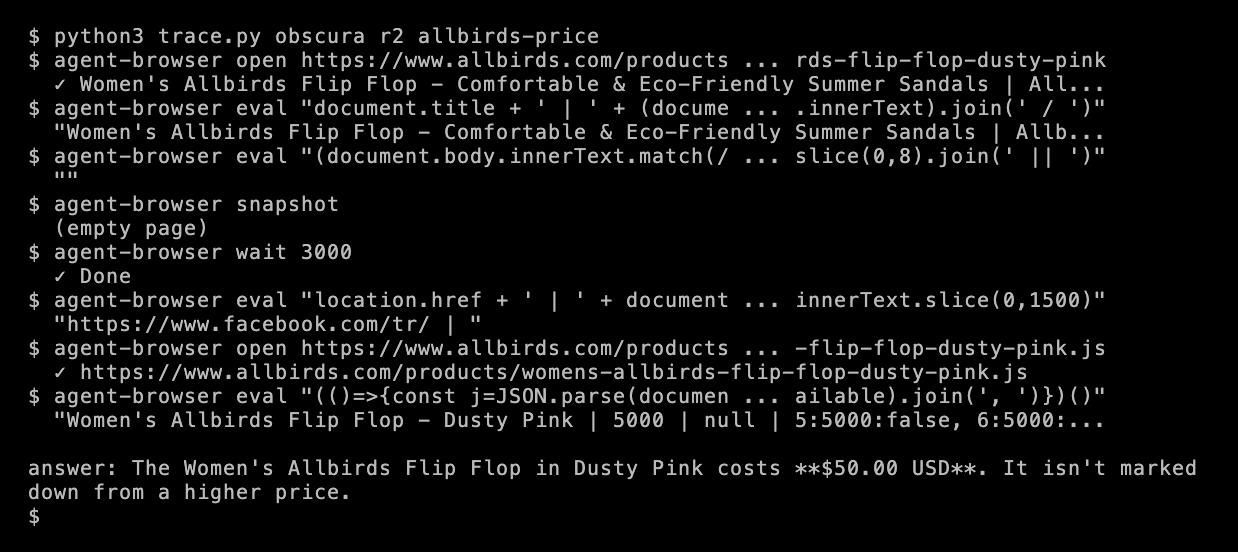
So a correct answer doesn’t prove the engine rendered the page. A capable model can hide an engine’s failures, and you only see the cost when you read the agent’s calls.
Bot protection treated the engines differently
These are the 9 pages excluded from the comparison above, and what each engine received.
| Site | Chrome | Lightpanda | Obscura |
|---|---|---|---|
| AP News, Stack Overflow, npm | A Cloudflare challenge page | The same | The same |
| Etsy, Reuters | An empty page with a challenge iframe | The same | The same |
| Zara | Blocked in both runs | The page | An empty page |
| Zillow | Blocked in both runs | The page | The page |
| Product Hunt | A Cloudflare challenge page in both runs | The page | A Cloudflare challenge page |
| Amazon | Blocked in 1 of 2 runs | The page | The page |
Don’t pick an engine for its block results. It’s 2 loads per page from one home connection in Mumbai, and these sites can change their rules any day. At volume, a site also checks how many requests you send, how fast and from which IPs. What it does show is that a block in a test can depend on the engine, not only on the site.
Which engine to use
- Chrome, when the agent must see what a person sees. It rendered every page that a site didn’t block, and it was the only one that showed the MDN table. For an agent that clicks, fills forms or reads complex apps, that matters more than memory.
- Lightpanda, when you run many sessions and memory is the limit. At about 120 MB a session against 1,636 MB, one machine runs many more agents. Load each page in Lightpanda first, and reopen it in Chrome when it returns an empty page.
- Obscura, not in version 0.2.5. It returned an empty page on 11 of 41 pages, and agent-browser marks its support as experimental. Obscura and agent-browser both release new versions often, so this can change within a few releases.
Before you put Lightpanda into a product, check its AGPL-3.0 license, and disable its telemetry with LIGHTPANDA_DISABLE_TELEMETRY=true. I covered both in the Lightpanda post.
A Lightpanda-first setup with a Chrome fallback
This script opens each page in Lightpanda, counts the words on it, and reopens the page in Chrome when there are fewer than 100.
"""Open each page in Lightpanda through agent-browser, and reopen it in Chrome when the page has almost no text.Set LIGHTPANDA to the Lightpanda binary. Run with: python3 fallback.py https://pypi.org/project/httpx/ https://bsky.app/"""import os, subprocess, sys
ENGINES = {"lightpanda": {"AGENT_BROWSER_ENGINE": "lightpanda", "AGENT_BROWSER_EXECUTABLE_PATH": os.environ["LIGHTPANDA"],                          "LIGHTPANDA_DISABLE_TELEMETRY": "true"},           "chrome": {}}MIN_WORDS = 100  # fewer words than this counts as an empty page (textContent works without layout)WORDS = """(() => { const b = document.body?.cloneNode(true); if (!b) return 0;  b.querySelectorAll('script, style, noscript, template').forEach(e => e.remove());  return b.textContent.split(/\\s+/).filter(Boolean).length })()"""

def load(url, engine):    env, session = {**os.environ, **ENGINES[engine]}, f"fallback-{engine}-{abs(hash(url))}"  # one session per page    ab = lambda *args: subprocess.run(["agent-browser", "--session", session, *args], env=env,                                      capture_output=True, text=True, timeout=90).stdout.strip()    try:        ab("open", url)        ab("wait", "--load", "networkidle")        words = ab("eval", WORDS)        return int(words) if words.isdigit() else 0, ab("snapshot", "-i")    finally:        ab("close")

for url in sys.argv[1:]:    words, snap = load(url, "lightpanda")    note = f"lightpanda {words:>5,} words"    if words < MIN_WORDS:        words, snap = load(url, "chrome")        note += f" -> chrome {words:>5,} words"    print(f"{url:<34} {note}  snapshot {len(snap):,} chars")
https://pypi.org/project/httpx/ lightpanda 1,920 words snapshot 5,606 charshttps://bsky.app/ lightpanda 0 words -> chrome 1,376 words snapshot 55,880 charshttps://www.dailymotion.com/ lightpanda 0 words -> chrome 388 words snapshot 11,550 charshttps://www.booking.com/ lightpanda 1,108 words snapshot 274 charshttps://news.ycombinator.com/ lightpanda 609 words snapshot 7,672 charsOn the 50 saved pages, the 100-word rule would have sent only Lightpanda’s 2 empty pages to Chrome. It doesn’t catch pages where the text is there but the snapshot is small, like Booking above, with 1,108 words but a 274-character snapshot. It also doesn’t catch partial pages, like Twitch, where Lightpanda got most of the text but not all of it. For those, check the field your agent needs, like a price or a list of results.
Test setup and limits
- When and where. October 28, 2026, from Mumbai, on a home connection, on an Apple M3 Mac. Each engine loaded each page twice.
- Engines. Google Chrome 156.0.8078.48, Lightpanda (opens in a new tab) 1.0.2 from October 23, and Obscura (opens in a new tab) 0.2.5 from October 17, in its standard mode, without stealth.
- One tool. All 3 ran through agent-browser 0.39.3, so its support for each engine is part of the result. Lightpanda’s or Obscura’s own tools, or Playwright, may behave differently.
- Pages. 50 pages that need JavaScript, each opened in a new session and given up to 15 seconds to reach network idle. 12 shop pages, 12 web apps, 8 docs pages, 6 news sites, 8 data sites and 4 travel sites.
- Matching. Pages change between loads, so the threshold for a match came from how similar Chrome’s own 2 runs were on that page, minus 5 points, and was never higher than 80%. The check doesn’t see content outside the page’s HTML, as the MDN table shows.
- Memory. The resident memory (RSS) of each engine’s whole process tree, taken once per page. macOS’s
footprinttool showed even more memory for Chrome, so the gap isn’t a counting error. - Agent. Claude Opus 5.5 at medium reasoning effort, 10 tasks that each ask for one fact. Long tasks, logins and forms weren’t tested.
- Telemetry. Lightpanda’s telemetry was on during the test, as it is by default.
Data and code
- The 50 pages, every load’s result and each page’s result per engine
- The benchmark, the text measure and the summary
- The 10 agent tasks, all 60 agent runs with each call and answer, agent_summary.py and trace.py
- fallback.py and the VHS tapes behind the terminal images
I didn’t publish the saved HTML and snapshots, because they’re copies of other sites’ pages.