Chrome DevTools MCP's --no-javascript-evaluation flag, tested: 39% more input tokens, 18 of 20 answers right
Chrome DevTools MCP, the MCP server Google built for AI coding agents, has a flag that stops the agent from running its own JavaScript in the page. It’s one flag, --no-javascript-evaluation, and it works as documented. But agents use that JavaScript to extract just the data they need, and without it, they take a full accessibility snapshot of the page instead.
I ran Claude Opus 5.5 on 10 real tasks through DevTools MCP 1.12.0, with and without the flag, twice each, on October 29, 2026. Without the flag, it answered all 20 correctly. With it, 18 of 20 were correct. It also used 39% more input tokens and cost 2.3 times as much. Both wrong answers came from the same task, which asked for a date the page showed only as “2 weeks ago”.
What DevTools MCP added for coding agents in Chrome 153 and 154
Google’s New in DevTools (opens in a new tab) post for Chrome 153 and 154 lists several changes to DevTools MCP for coding agents. One is the option to “inspect pages without evaluating scripts, extending across navigations and initialization scripts”. The flag itself is older. DevTools MCP 1.9.0 extended it to navigations and init scripts on September 8.
The other changes matter less for data collection, like heap snapshot queries, lazy loading of source maps to save memory on large sites, and Progressive Web App (PWA) automation tools.
What the flag blocks
An agent using DevTools MCP has an evaluate_script tool by default, which runs any JavaScript the agent writes inside the page. When it opens a page, the agent can also pass an init script, which runs before the page’s own scripts. It can also open javascript: URLs. Here’s what happens to each one, with and without the flag.
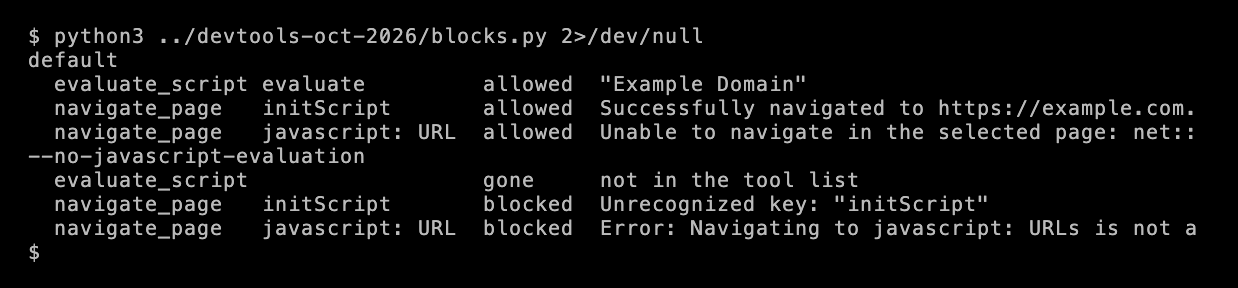
With the flag, evaluate_script is removed from the agent’s tool list, the init script is rejected, and javascript: URLs are refused. The page’s own scripts still run, so the site works as usual.
The project’s security policy (opens in a new tab) are clear that the flag “is not a JavaScript sandbox and does not create a browser-wide execution boundary”. Clicking or typing can still trigger the page’s own event handlers. The flag only removes the agent’s way to run its own code.
Why a team would enable it
A browser agent’s script runs in the page’s origin, with the same privileges as the page’s own scripts. It can read the page’s localStorage and send requests with the logged-in user’s cookies. Pages can also hide instructions for the agent, known as prompt injection, which I covered in prompt injection for scrapers. If the agent follows them, evaluate_script is the easiest way for them to steal the user’s data. With the flag enabled, the agent can’t run its own scripts, but it can still read, click and type.
What it cost
The 10 tasks are the same as in the headless browser test. Each asks for one fact from a real page, like a price on Allbirds, the latest Playwright release on GitHub or a year on Wikipedia.

Most answers were still correct. Claude got 18 of 20 right with the flag, and the median run time was about the same, 14 seconds compared with 16.
Input tokens rose by 39%. Without the flag, evaluate_script was Claude’s most-used tool, in 33 of its 89 tool calls. It used small scripts to extract just the fact it needed. With the flag, it took a full accessibility snapshot of the page instead, and those snapshots are large.
The cost rose more than the tokens. At Opus 5.5 prices in October 2026, a cache write costs $5 per million tokens and a cache read costs $0.20. Every new snapshot is content the cache hasn’t seen, so it’s billed as a cache write. The runs with the flag wrote 930,870 tokens to the cache, compared with 356,222 without it, so the total cost went from $2.22 to $5.06.
Where the difference came from
2 tasks show it clearly.

On Wikipedia, the task was to follow a link and find a year. Without the flag, Claude’s scripts returned 395 and 2,395 characters. With it, Claude took 2 full snapshots of about 100,000 and 120,000 characters, and the run used about 4 times as many input tokens as without the flag.
On GitHub’s releases page, the task was to find the latest release and its date. Without the flag, one script read the exact timestamp from the page’s datetime attribute, 2026-10-14T11:51:33Z, in 179 characters. With the flag, the snapshot showed only “2 weeks ago”. In both runs, Claude answered October 13, based on other timestamps on the page, and said this was an inference. In the second run, it tried hovering over the date for a tooltip, which returned nothing, and added that it could be October 14, depending on the time zone.
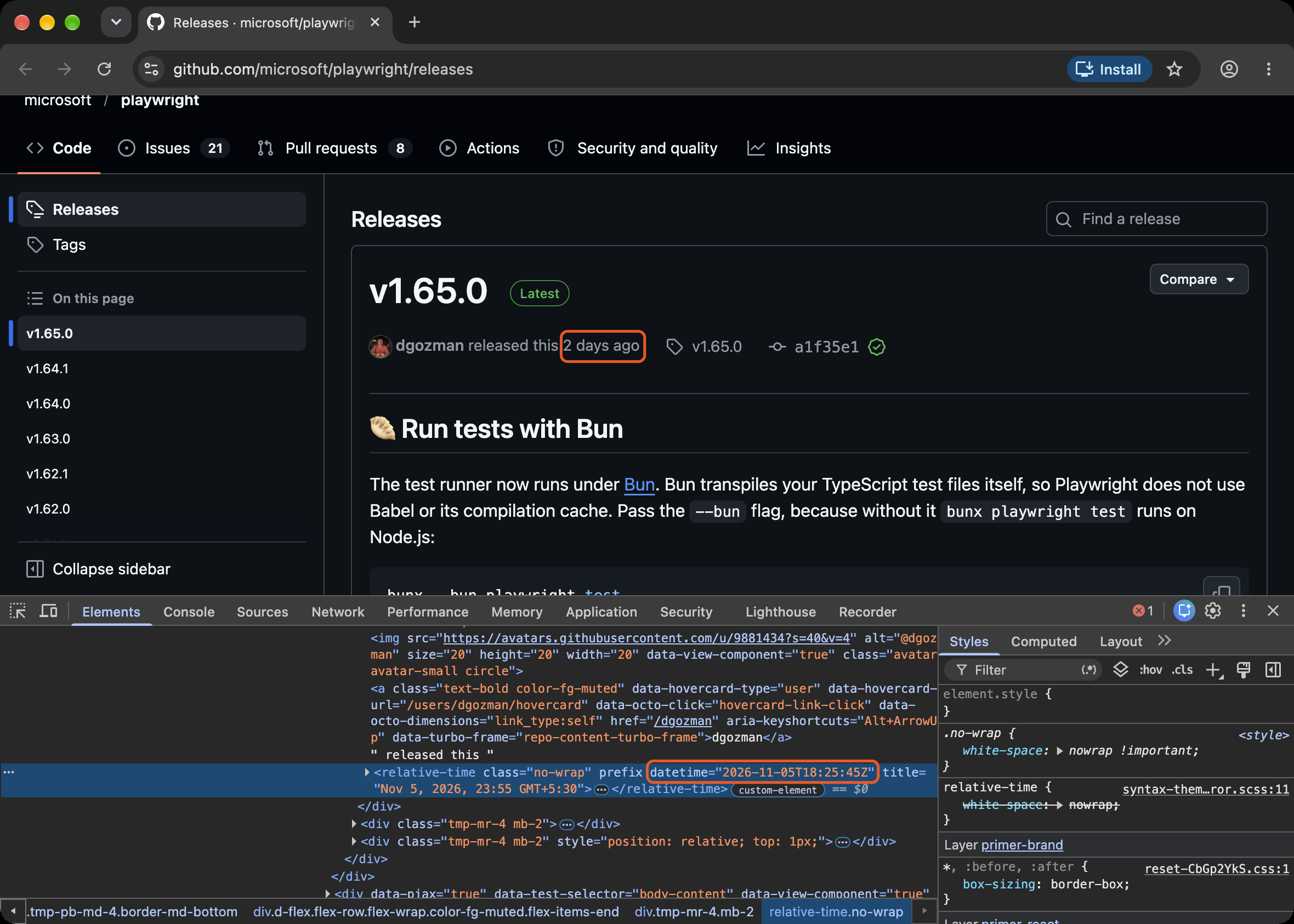
The exact date is in DevTools MCP’s verbose snapshot, as “Oct 14, 2026, 17:21 GMT+5:30”, the same format as the title attribute in the screenshot above. But that snapshot was 387,643 characters on this page, about 3 times the default one, and Claude didn’t request it in either run.
What to do with it
- Enable the flag when the agent browses untrusted pages while it’s logged in to an account. That’s where
evaluate_scriptcarries the most risk, and reducing that risk is worth the extra tokens. - Expect more input tokens on simple lookups. In this test, most answers were still correct, but taking full snapshots used 39% more input tokens and cost 2.3 times as much money.
- Be careful with facts that appear only in HTML attributes. Exact dates, prices in data attributes and product IDs often don’t appear in the visible text. With the flag enabled, tell the agent when to use the verbose snapshot, or check those attributes another way.
- For data collection at scale, use a scraper, not an agent. A scraper that reads the field directly is usually cheaper than either mode, and it isn’t exposed to prompt injection, because it doesn’t treat page text as instructions.
Test setup and limits
- When and where. October 29, 2026, from Mumbai, on a home connection, on an Apple M3 Mac.
- Tool. Chrome DevTools MCP 1.12.0, headless, with a new browser profile for each task.
- Agent. Claude Opus 5.5 at medium reasoning effort, with the tool definitions and system prompt cached across turns. Other models may call
evaluate_scriptmore or less often. - Tasks. 10 tasks that each ask for one fact, 2 runs per mode. Multi-step tasks, logins and forms weren’t tested. On the GitHub stars task, the count was about 44,800 on test day, so both 44.7k and 44.8k counted as correct.
- Cost. Opus 5.5 prices per million tokens are $4 for input, $5 for cache writes, $0.20 for cache reads and $20 for output.
Data and code
- The 10 tasks and all 40 agent runs, with each tool call and answer
- The script that checks what the flag blocks, the tool list in both modes, summary.py and compare.py
- The VHS tapes behind the terminal images