rea vs Playwright MCP for finding a web page's hidden API, tested on 8 pages
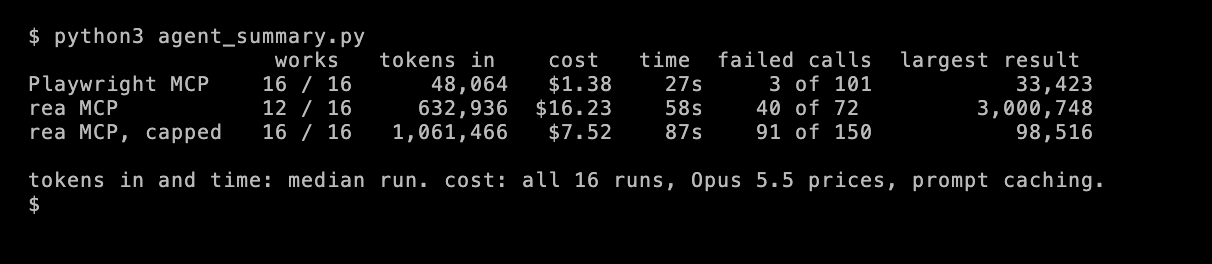
rea, short for Reverse Engineer Anything, can find the API behind a web page. In my test, Claude found the same APIs with rea as with Playwright MCP, after I capped the size of rea’s tool results. But rea cost far more to do it. Its 229 tool definitions add 103,531 tokens to every turn, compared with 6,796 for Playwright MCP. Claude Code avoids most of that cost, because it loads a tool’s definition only when the agent searches for it. Also, one rea network capture returned 3 million characters, more than Claude’s context window can hold.
So for finding the API behind a page, a browser MCP server that lists network requests worked better in this test. rea is built mostly for apps and binaries, and its web tools are a small part of it.
What rea is
rea (opens in a new tab) is an MCP server and command-line tool for reverse engineering. It had about 399,000 GitHub stars on October 28, 2026. It’s MIT-licensed, and version 6.8.0 came out on October 25. It works with native binaries, Electron apps, .NET, Android apps, firmware and websites.
For websites, it can record a browser session with its network traffic, read saved HAR files and search a page’s JavaScript files for API endpoints. That’s the part a scraping team would use. Finding the JSON API behind a page, often called a hidden API, is usually the fastest way to scrape its data, and a scraper built on it breaks less often than one that parses the HTML.
The test
I gave Claude Opus 5.5 the same job on 8 pages. The job was to open the page, find the API request it uses to load its data, and write a short Python script that calls that API directly and prints the first 3 items.
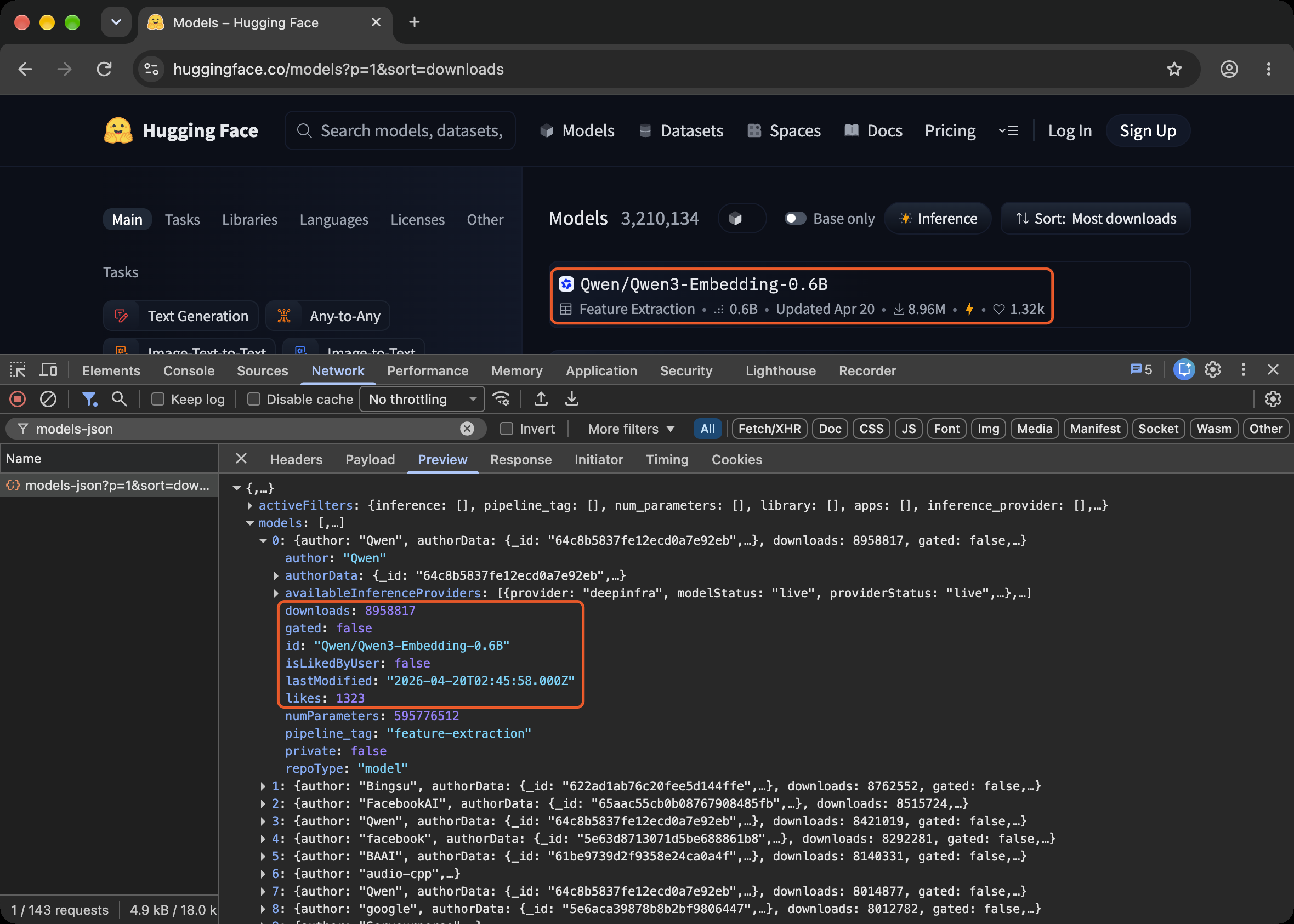
The pages were Bluesky’s Discover feed, Hugging Face’s model list, the serde crate on crates.io, Twitch’s category list, an IKEA product list, Bilibili’s homepage, Imgur’s front page and Hacker News. Hacker News was the control case. It puts its stories directly in the HTML, so the right answer is that there’s no API.
Claude ran each task twice with rea, and twice with Playwright MCP, Microsoft’s browser MCP server. A third setup, rea with a cap on tool result size, is explained below. A script counted as working only if it ran and printed the data.
What the tools cost before any work starts
In a basic agent loop, the agent sends the model its tool definitions on every turn. They are the name, description and input schema of every tool. That’s a fixed cost, paid before the agent does anything.
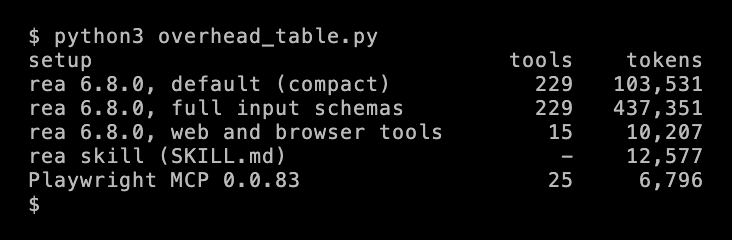
rea has 229 tools, for every kind of target it supports. A web task needs only about 15 of them. Those cost 10,207 tokens, close to Chrome DevTools MCP’s 11,079 in my earlier test. The other 214 are sent anyway. rea setup also installs a skill, a set of instructions for Claude. With it, every turn sends about 116,000 tokens before the page is even opened.
rea already sends compact input schemas by default to save tokens. The full schemas are 437,351 tokens. rea’s own docs warn that agents “pay context for every advertised tool schema”. On October 26, the day after 6.8.0, rea’s main branch added a setting that loads only selected tool families, which are groups of related tools. It’s called REA_MCP_TOOL_FAMILIES, and it wasn’t in a release yet when I tested.
Claude Code avoids most of this cost. It defers MCP tools, which means it sends only their names and loads a tool’s full definition when the agent searches for it. With rea connected, Claude Code 2.1.216 used about 35,000 tokens of context, the same as with no MCP server, and listed rea’s tools as deferred.
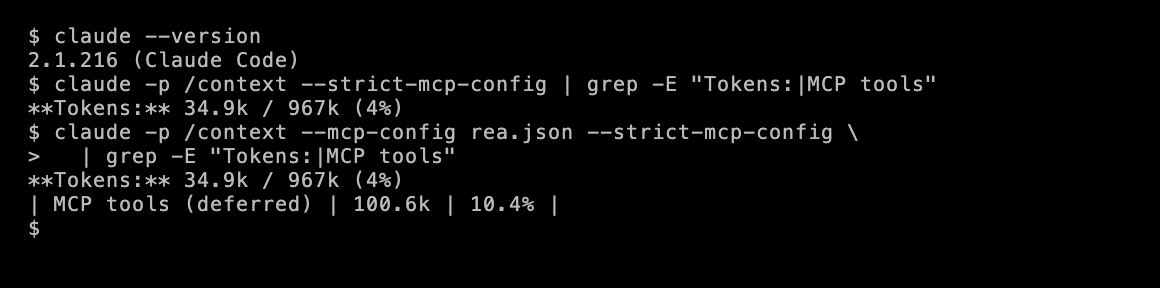
So the cost above applies to agents that send every tool definition, like a custom agent on the Claude API, and to MCP clients without tool search. On the API, Anthropic’s Tool Search Tool does the same job as Claude Code’s deferred tools.
What Claude did
Both found the same APIs. They were a models-json endpoint on Hugging Face, the public crates API on crates.io, Twitch’s GraphQL endpoint and an IKEA search API. Bilibili’s API needs a request signature that the page computes in JavaScript, and both wrote code for it. On Hacker News, both said correctly that the page makes no API request.
rea used about 13 times as many input tokens per run. Most of these were the same 116,000 tokens of tool definitions, sent again on every turn. Prompt caching makes repeated tokens cheap, but the 16 rea runs still cost $16.23, compared with $1.38 for Playwright MCP.
Every rea run began with 2 wasted turns. To save tokens, the compact input schema for rea’s browser tool doesn’t show the format of a browser action. So in every run, Claude guessed the format wrong twice and fixed it from the error message. Each wrong guess resent the 116,000 tokens.
4 captures overflowed the context window
In 4 of the 16 rea runs, on Twitch and Imgur, the agent recorded the page’s network traffic and received a tool result larger than Claude’s context window.
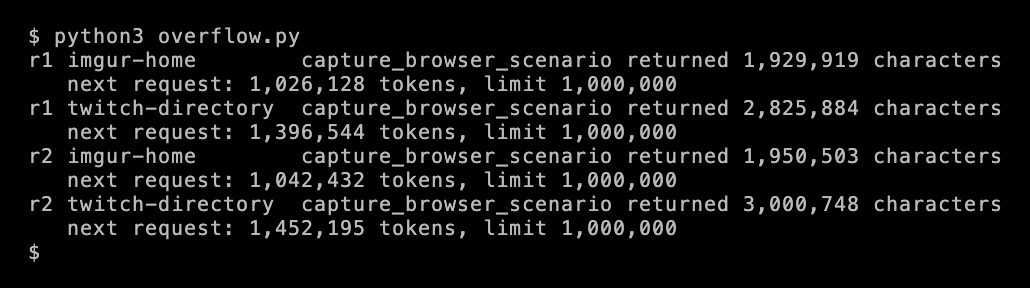
Claude hadn’t asked for the response bodies. But rea returns everything it records in a single result, and on Twitch, the list of requests alone, without response bodies, was 3 million characters. Claude’s context window is 1,000,000 tokens, so the next call to the model failed and the run ended without an answer.
MCP clients like Claude Code usually cap the size of a tool result, and my test script didn’t at first. So rea also ran with a cap of 100,000 characters. A result over the cap comes back as an error that asks for a smaller one.
With the cap, rea worked as designed. Claude requested a smaller capture, or read the capture in chunks, and it found the Twitch and Imgur APIs in both runs. But it took about 1.5 times as many tool calls as Playwright MCP, and a median of 87 seconds a run, compared with 27.
Where rea did better
Claude verified its answers more often with rea. In about half of the rea runs, it ran its own Python script before answering, to check that the API really returned the data. Playwright MCP can’t run Python, so in those runs, Claude mostly tested the request with fetch() inside the page instead.
Claude also noted what it hadn’t seen. In one Hugging Face run with rea, it wrote that the URL was “inferred and then tested, not observed”, because the recording had missed the request. Its script worked, but that note is exactly what a reviewer needs to know.
What to use
- To find the API behind a page, use a browser MCP server that lists network requests. Playwright MCP found every API in this test with less than a tenth of rea’s tokens. Chrome DevTools MCP has the same kind of tool,
list_network_requests. - Use rea for what it’s built for. Its tools for native binaries, Electron, Android and firmware have no equivalent in a browser MCP server. For web pages, it adds a record of the evidence behind each answer, but in this test it didn’t find more APIs.
- If you install rea, keep its tool definitions and large results out of the context window. Claude Code does both by default. It defers MCP tools, and it caps tool result size with
MAX_MCP_OUTPUT_TOKENS. In your own agent, use tool search and a cap on tool result size. WhenREA_MCP_TOOL_FAMILIESis in a release, load only the web tools.
Test setup and limits
- When and where. October 28, 2026, from Mumbai, on a home connection, on an Apple M3 Mac.
- Versions. rea 6.8.0 with the skill that
rea setupinstalls, on Node.js 24.22.1. rea 6.8.0 needs Node.js 22, 24, or 26.12.1 or newer, and itsrea doctorcheck rejected 25.9 and 26.7. Playwright MCP 0.0.83. Both got the same short system prompt, plus the operating system and the path to Chrome, which rea needs to start the browser. - Agent. Claude Opus 5.5 at medium reasoning effort, up to 30 turns, with the same test script as my MCP comparison. Other models may handle rea’s compact input schemas differently.
- Pages. 8 public pages, no logins, one API each. Longer jobs, like rebuilding a feature from an app, may suit rea’s evidence tools better.
- The cap. The capped rea runs used a 100,000-character cap on each tool result. Without it, 4 runs failed. The results under “What Claude did” show both.
- Grading. I ran each script on the day of the test. Bluesky’s API returned errors to every setup’s script for about an hour, so I reran all 6 Bluesky scripts together after it recovered, and all 6 worked.
- Cost. Opus 5.5 prices per million tokens are $4 for input, $5 for cache writes, $0.20 for cache reads and $20 for output, with the tool definitions and system prompt cached across turns.
Data and code
- The 8 tasks and every run’s result, with tokens, calls, errors, the largest result and whether the script worked
- The tool cost measurement and its results
- The grader, agent_summary.py, overflow.py and the VHS tapes behind the terminal images
I didn’t publish the agents’ scripts, because some of them reproduce a site’s request signing.